MTPE Guide 2026: Human-First LLM Workflows That Save Time
How to run light and full machine translation post-editing so human judgment enters before and during generation, not just after the draft is done.

On this page
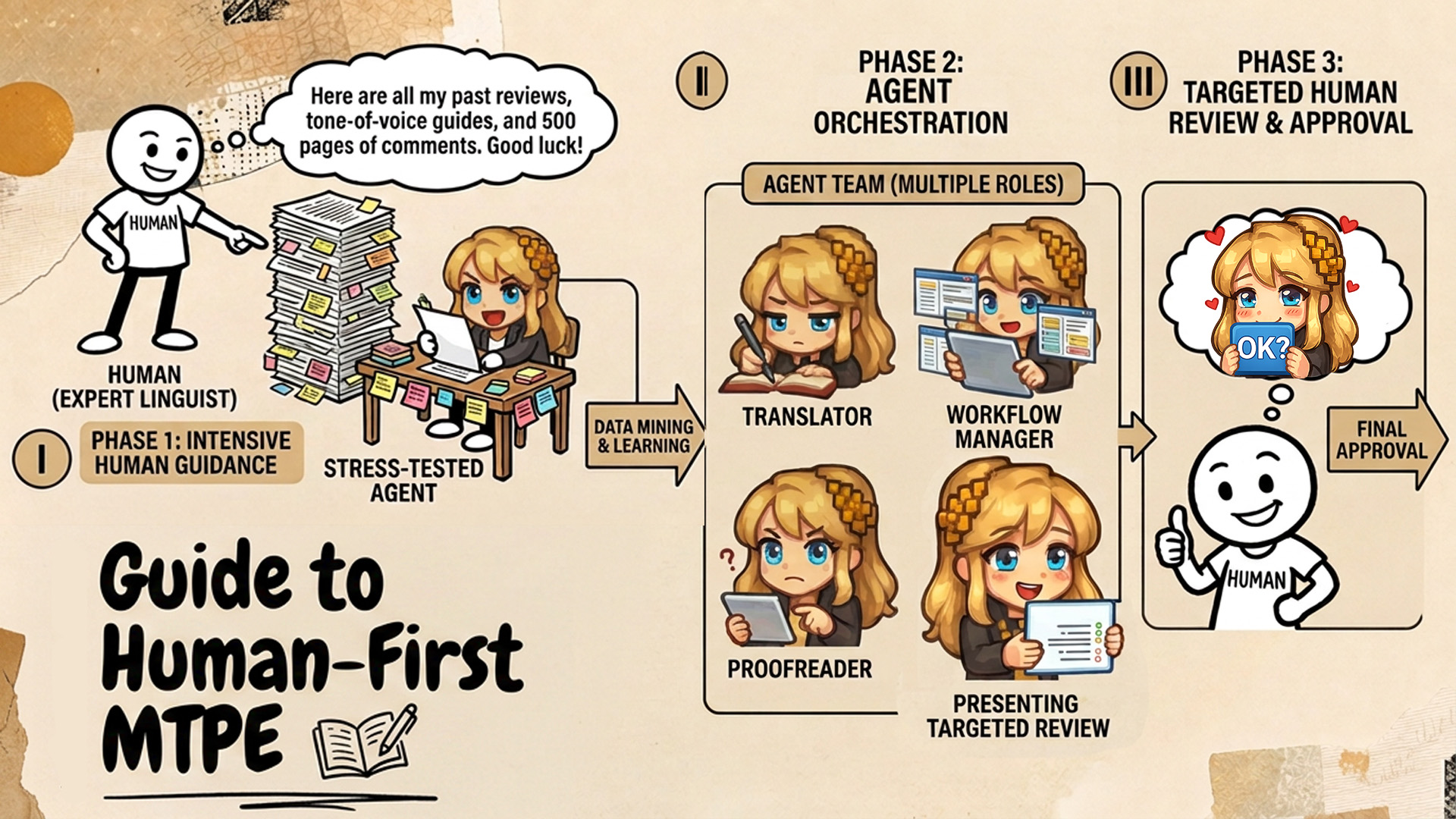
Machine translation post-editing (MTPE) traditionally works in one order: a machine translates the whole text, then a human fixes errors, terminology, tone, and formatting. Light MTPE aims for a usable translation; full MTPE aims for publication quality.
That order made sense when machine output was obviously rough. LLMs fail differently. Their drafts read fluently while hiding omissions, drifted meaning, and flat choices, and a finished draft anchors the translator to the model’s wording.
So in this guide the human comes first. You brief the model before it writes, steer it while it works, and spend your own reading time only where judgment is needed. I show it in Transept, the tool I build and use, on a short literary chapter translated from English into German. The same moves work in any tool that lets you feed the model context.
How do light and full MTPE differ?
Both start the same way. What changes is the quality bar and how deep your own review goes. In either one, your job is to do enough, not to make every line perfect.
| Light MTPE | Full MTPE | |
|---|---|---|
| Goal | Accurate, usable text | Publication quality |
| Your time | ~80% briefing and steering, ~20% polish | Same start, then mostly testing and refining |
| What you read | Only what the agent flags | Targeted reviews, then a creative pass |
My routine has three moves: tell the machine what you want before it starts, let it do its best while it points you to weak spots, then polish what it flagged. My essay on MTPE explains why I stopped editing full machine drafts line by line.
How do you run human-first light MTPE?
1. Brief the model with a glossary and a style guide
Glossaries and style guides are prompts you write once: the model gets your terms, tone, and usage on every run. For a new genre I let Transept draft both from the source text, then correct them. I rarely agree with the first draft, but the fix is often small. Below, the model wanted the long compound Leuchtturmwärter, and the islanders in this book just say der Wärter.
The style guide gets the same treatment. I add the rules I can feel but not yet explain as plain do’s and don’ts. When I need a second opinion, I argue with Literess: she can look things up and knows my past decisions.
2. Translate one seed page, then comment on it
Next I translate only the first page with Translate + Proofread, which drafts and then polishes. It shows the best the model can do with my brief, for the price of a page instead of a book.
Then I leave comments on what works, what’s missing, and where the translation should go. Mention @Literess in a comment and she answers in the thread. Get a fix turns the discussion into a suggested edit that you accept or dismiss.
To check that the comments landed, run Proofread on the page again. It reads the threads: on another passage it noticed that an accepted fix had dropped a word its thread agreed on, and put it back.
3. Let translation memory carry page 1 into page 100
Translation memory is how the seed page’s decisions reach the rest of the book. Transept stores each past translation together with the comments around it and the drafts it replaced, and searches by meaning as well as by words (our research on how that works). Two details matter here. Memory also searches the document you’re in, so a decision from chapter 1 resurfaces in chapter 10. And when proofreading, it leaves out raw machine lines that nobody edited.
For light MTPE, check three settings in the Memory panel: keep Exclude this doc off, turn on Enhance results (an AI re-rank of the matches), and include discussions and alternatives.
4. Run translate-then-proofread on the whole document
Now translate the rest. A workflow chains actions: translation, proofreading, targeted checks, and stops where a human must look, say at dialogue or legal clauses. You can build your own, start from a template, or ask Literess to set one up.
For light MTPE, Translate + Proofread is enough. The translation draws on memory, comments, the glossary, and the style guide; the proofread then fixes only the blocks that need it. For a long text like a novel, turn on Translate faster with parallel agents under Customize. Several agents work on different parts at once and keep a shared glossary and style guide in sync, which you can merge into yours afterwards or discard (long documents).
5. Review only what the agent flags
When the run finishes, the instinct is to read everything. Don’t. Ask an agent to find the weak spots and review those: binding clauses in terms and conditions, places where source and translation diverge, style drift. With memory, the glossary, and the style guide to compare against, it finds them well.
In Transept, describe what to look for under Custom find in the Workflows panel, in your own words. It drafts the exact check, with its price, for you to run.
The findings open in the review screen. Switch Suggestions to 3 options when a line needs a choice rather than a correction. And keep your veto: this check flagged Zug in block 7, the very word my comment asked for, so I pressed Resolve, keep text.
The same check can also run as a step inside a workflow, or come from Literess, who is at her best on the page you’re working on and can set up a workflow or a review for you.
How does full MTPE build on the light baseline?
Full MTPE starts where light MTPE ends. The light result becomes the baseline, and the work moves to testing, creative refinement, and publication-level QA. You still don’t have to reread every page to do it.
1. Build a battery of targeted reviews
While translating my novel, my reviews settled into three checks I ran every time:
- Character introspection: did the translation infer each character’s intentions correctly? The thoughts behind their speech carried the plot.
- Coined words and wordplay missing from the glossary or style guide, so I could decide whether to keep them.
- Character voice: lines where someone sounds unlike themselves elsewhere in the book, checked against translation memory. Most shifts were real emotion; a few were register slips that only a human would notice.
I saved them as one workflow that runs while I’m at my day job. It sends me a notification when it’s done, and I go through the findings on my phone.
2. Tune translation memory to your content
Semantic search finds matches too weak for a human to reuse, but strong enough to show the model what you expect. Three setups work for me.
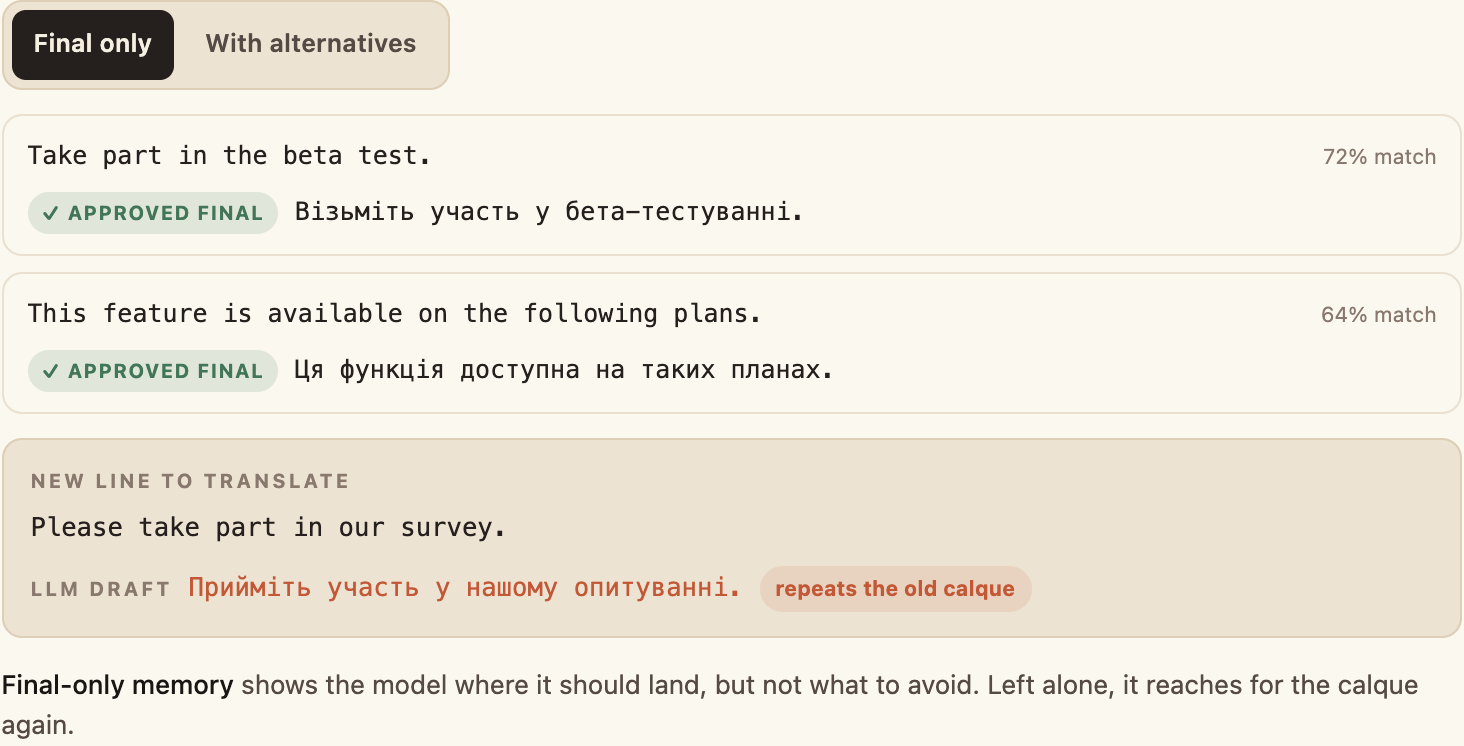
Include alternatives. Rejected drafts teach the model what to avoid. When I edited Ukrainian help articles, most of the work was removing Russianisms; with before-and-after pairs in memory, the model learned the standard.
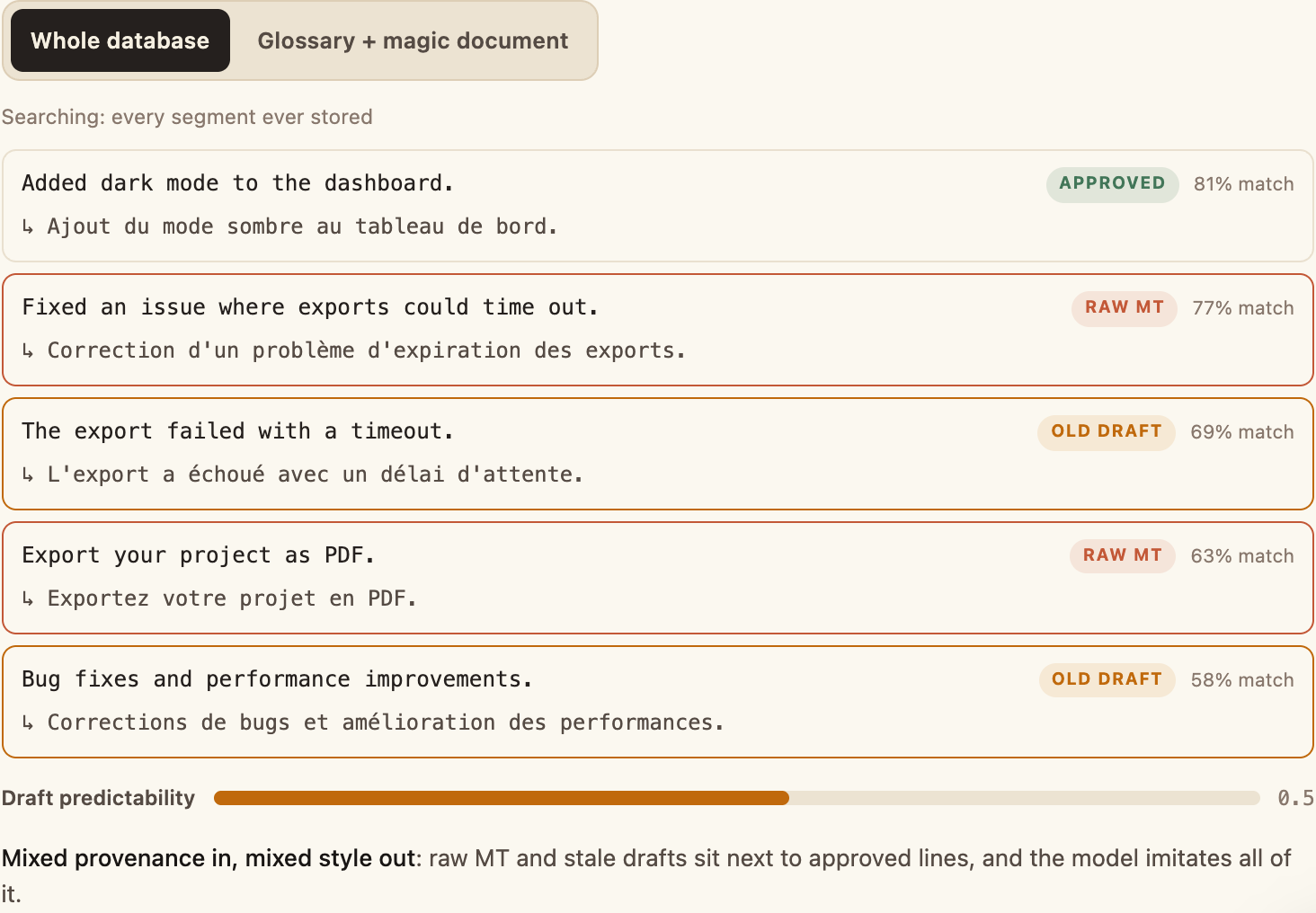
Use one magic document. For recurring content like changelogs, pair a glossary with one curated document of your best translations instead of your whole database. Every match is then one you’d sign.
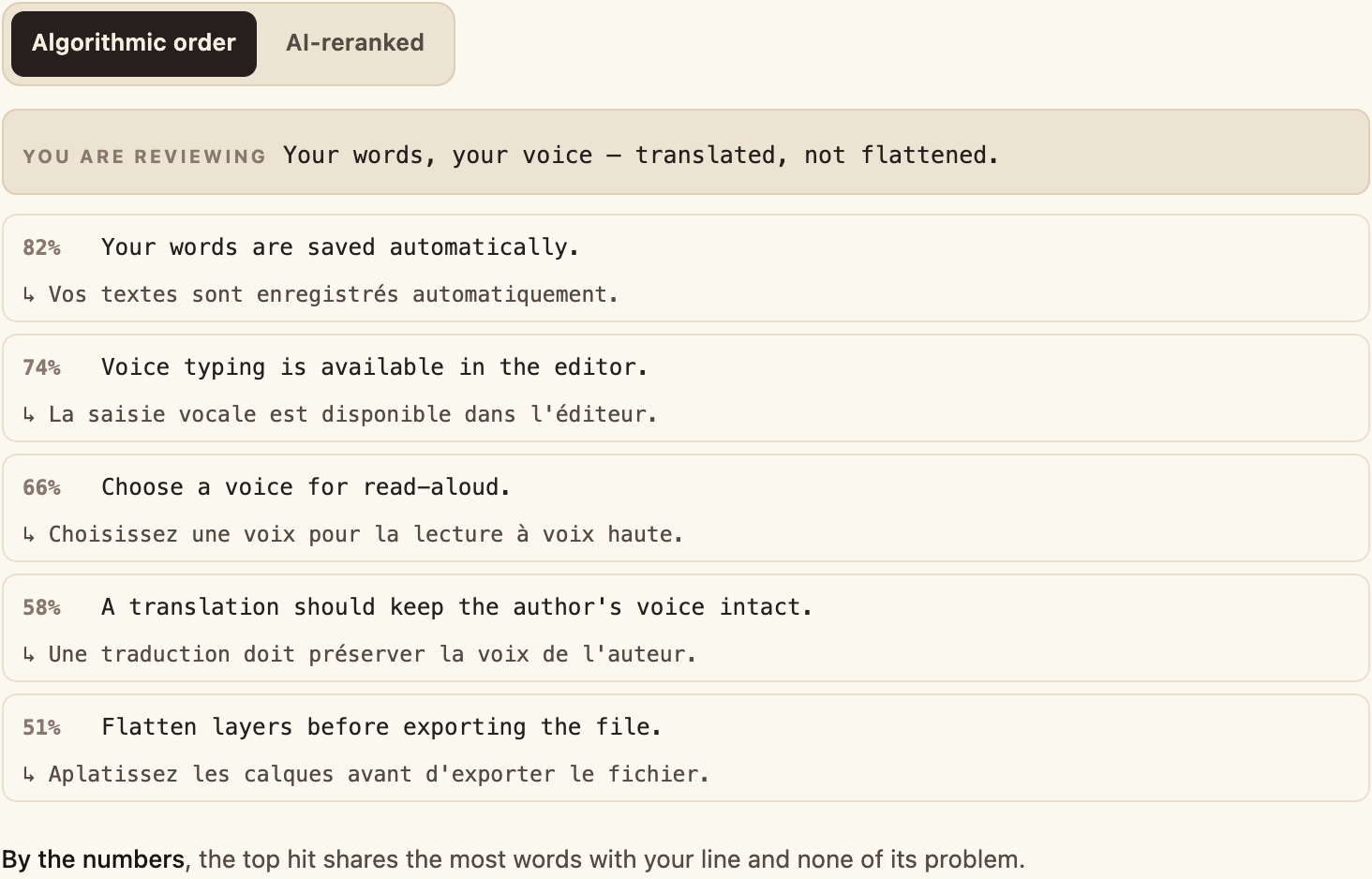
Turn on Enhance results while you review. The AI re-rank pushes the useful matches to the top even when their score is low, so I scroll less with the Memory panel open.
3. Teach your agent your personal taste
Your own preferences, beyond the agency’s standard and the client’s brand guide, are an underrated asset. Some are quirks you can’t name yet.
I end a working session by talking it over with Literess: which patterns she sees, where we disagree, what to keep. Then I ask her to remember it. She saves a note she reads before every conversation (up to 20 of them). Here she also wrote the rule into the style guide, so every future run follows it.
That’s what I built Literess to be: a colleague who starts each pass from what we already agreed, not a replacement that follows prompts blindly.
FAQ
What is machine translation post-editing (MTPE)?
Machine translation post-editing is reviewing and improving a machine-generated translation until it reaches a defined quality target. Traditionally the machine drafts everything first and a human corrects it afterward. In a human-first workflow, the translator also guides generation in advance with context, comments, glossaries, style guides, and translation memory.
Does LLM translation still need human post-editing?
Yes. Fluent output is not necessarily correct output. An LLM can write natural sentences while dropping meaning, misreading context, drifting from required terminology, or flattening a distinctive voice. A human still defines what good means, decides the ambiguous cases, and checks the passages where mistakes have consequences.
When is MTPE worth it, and when should you translate from scratch?
MTPE is worth it when the machine produces a useful baseline and you reach the target quality faster than by starting over. There is no honest universal savings percentage: test representative content and track your editing time. If you are rewriting most sentences, correcting the same errors repeatedly, or fighting the draft’s structure, improve the model’s context or translate that content from scratch.
How should MTPE quality be measured?
Against the text’s intended use, not a single automatic score. Check source fidelity, omissions, critical errors, terminology, style consistency, editing time, and the issues found in QA. Automated metrics and AI reviews help locate risk, but creative, cultural, legal, and brand-sensitive decisions still need a qualified human.
How can you scale human-first MTPE across many small documents?
Build the human judgment once and reuse it. Create a shared glossary and style guide, approve a representative seed translation, and let those decisions enter translation memory. Save the translation, proofreading, and review steps as a team workflow, then apply it across the backlog. Humans review the exceptions and high-risk passages instead of re-explaining the brief for every file.
The author
Co-founder of Transept, writing as “Mevkh.” A Language and Literature degree, then a turn into software: senior AI engineer shipping production LLM features to 50,000+ users — RAG, agentic tools, LLM-as-judge evaluation. A novelist on the slow path, with 120,000 words of satirical romance fantasy in a drawer. The friction between AI translation and his own prose is what set this whole thing in motion.