Ethical and Responsible AI

The AI drafts. You decide.

In Transept the AI suggests and a person decides. Every document records which was which, and nothing you write is used to train a model.

Literess, the AI editor in Transept

You: Make Grandma grumpier.

Literess: Done. She doesn’t just say it anymore. She grumbles it. sagte → raunzte

Ask in plain words. You approve every change. Meet Literess →

Our commitments✦

Six things we hold to

A person approves the work

Literess, our AI editor, proposes each change and waits for your click. Proofreading fixes can be reviewed one by one, with Accept and Undo, and a workflow can stop at a review step until someone signs off. If you turn on Allow All, her changes apply without the click, and they are still listed as hers.
Your work never trains AI

We don't use your documents to train models, and neither do the AI providers we use. That holds on every plan, the Free plan included.

A record of who wrote what

Every document keeps an activity record: what a model wrote, and what a person changed, accepted or approved. The originality report counts it by word and turns it into a PDF.

Your text stays private

Our team doesn't read customer documents in routine work. For a support case, we ask you to send us the document you need help with. Our logs never contain your document text.

Honest about AI

We don’t sell ways to hide AI use or promise text that passes as human-written. When a publisher, a journal or a client asks whether AI was used, the answer is yes, and the originality report shows what you changed and reviewed.

European, under the GDPR

Transept is run from Prague, and your documents are stored in Germany. Every company that handles your data is listed on our sub-processors page, with what it does and where.

How it works✦

Where the person stays in charge

  1. 1AI

    The AI drafts

    A translation run writes the first version, steered by your glossary and style guide.

  2. 2AI

    Literess proposes

    Her edits and fixes arrive as suggestions for you to accept or decline.

  3. 3You

    You review

    Each change has Accept and Undo, and every version, the AI's and yours, is kept.

  4. 4You

    You sign off

    Before every export, Literess asks whether you read the translation through.

  5. 5Record

    The record shows it

    Who wrote what, by word, with your dated confirmation, in the originality report.

In the app✦

What it looks like in the editor

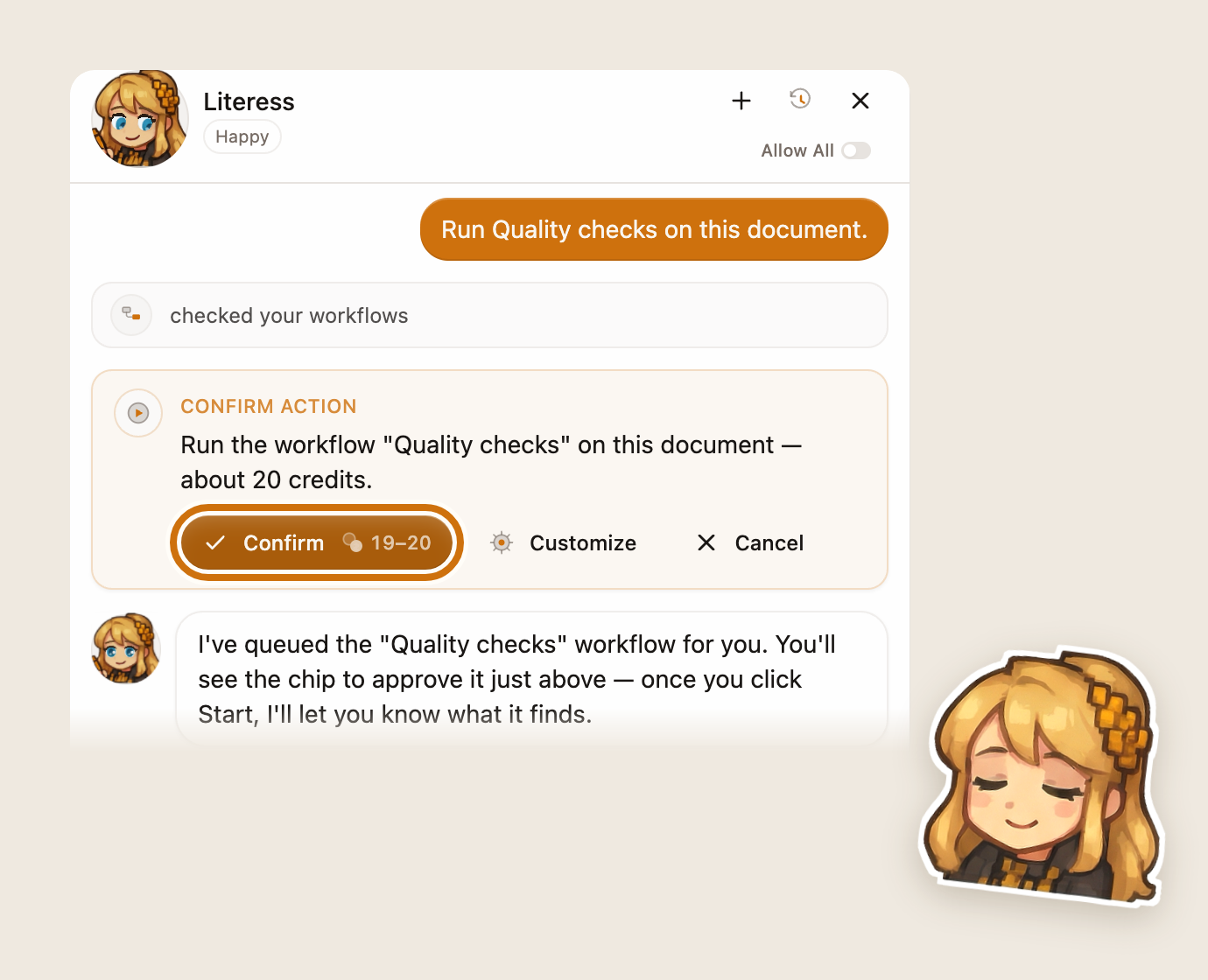
Literess’s chat: the user asked her to run Quality checks, and she shows a Confirm action card with the price, Confirm outlined, Customize and Cancel beside it, and waits for the click.
Literess asks before she acts: Confirm, Customize or Cancel.
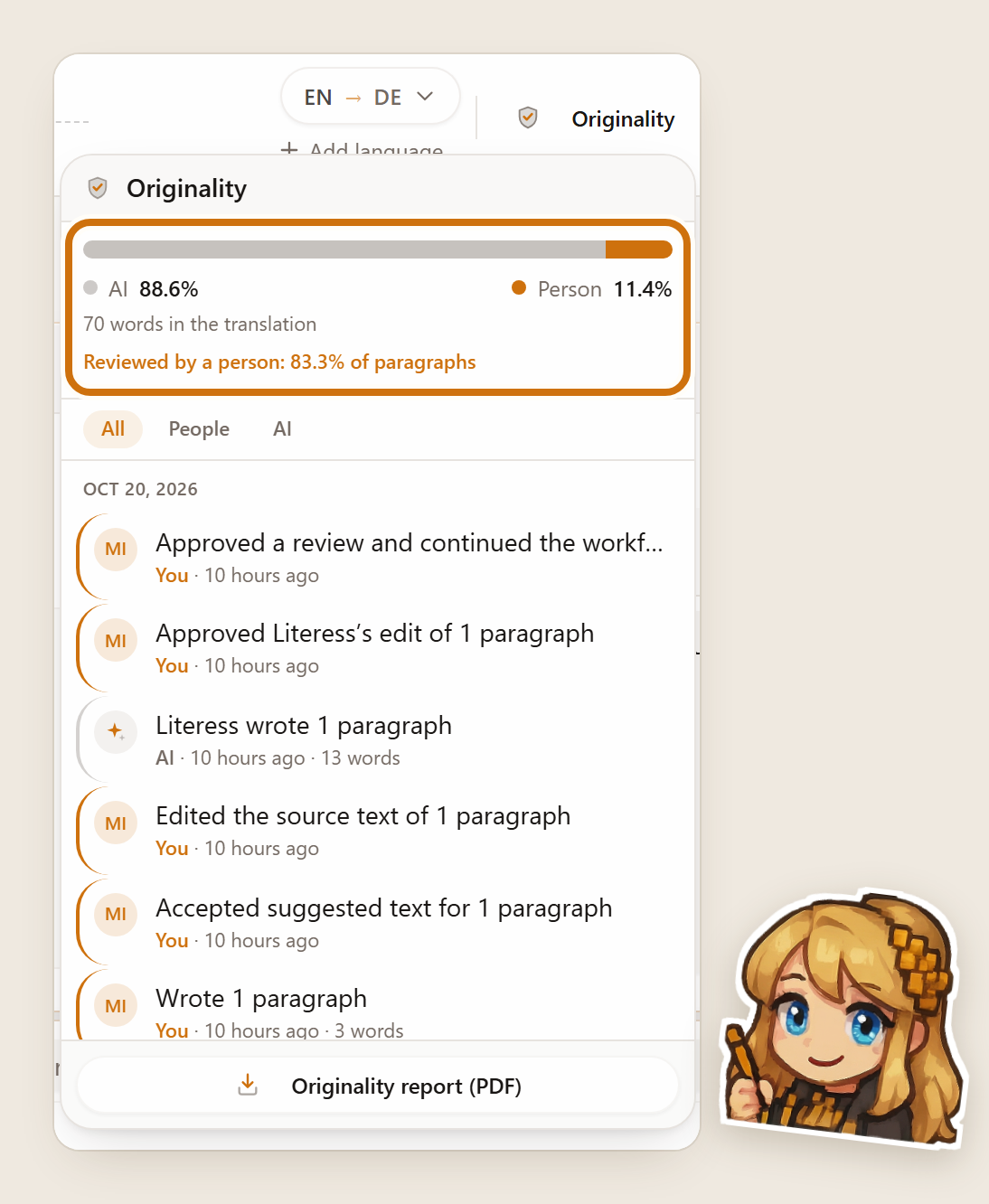
The Originality panel in the editor: the AI and person shares by word and the share of paragraphs reviewed by a person, outlined, above the activity list with each line marked as the person’s or the AI’s.
The Originality panel: who wrote what, by word, and everything that happened to the document.
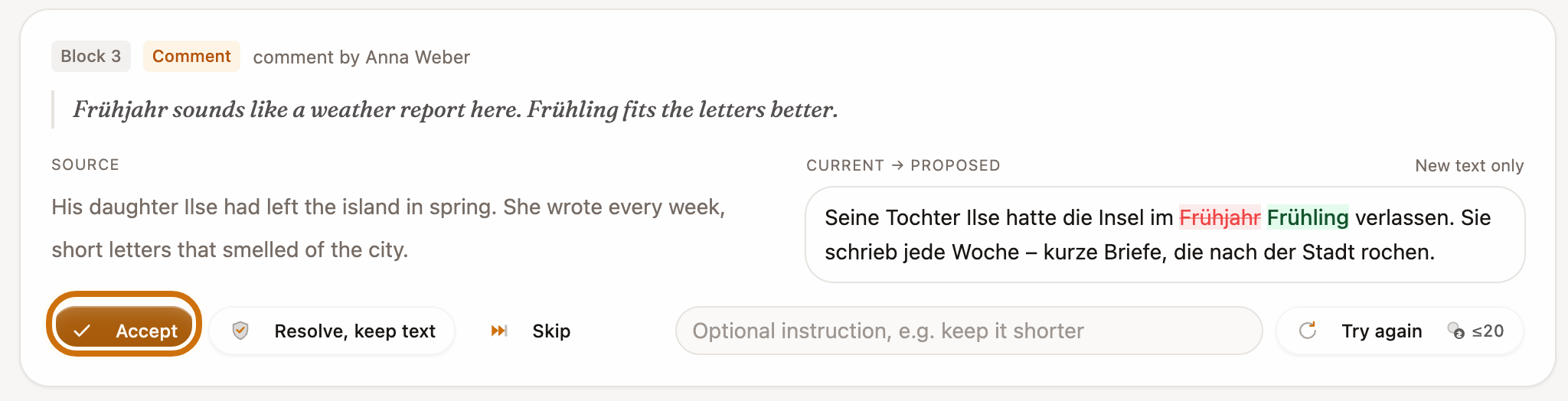
A review-screen card: a reviewer’s comment, the source sentence, the current translation with the proposed change marked, and the Accept button outlined next to Resolve, keep text and Skip.
On the review screen, a fix waits for Accept, shown against the text it would replace.
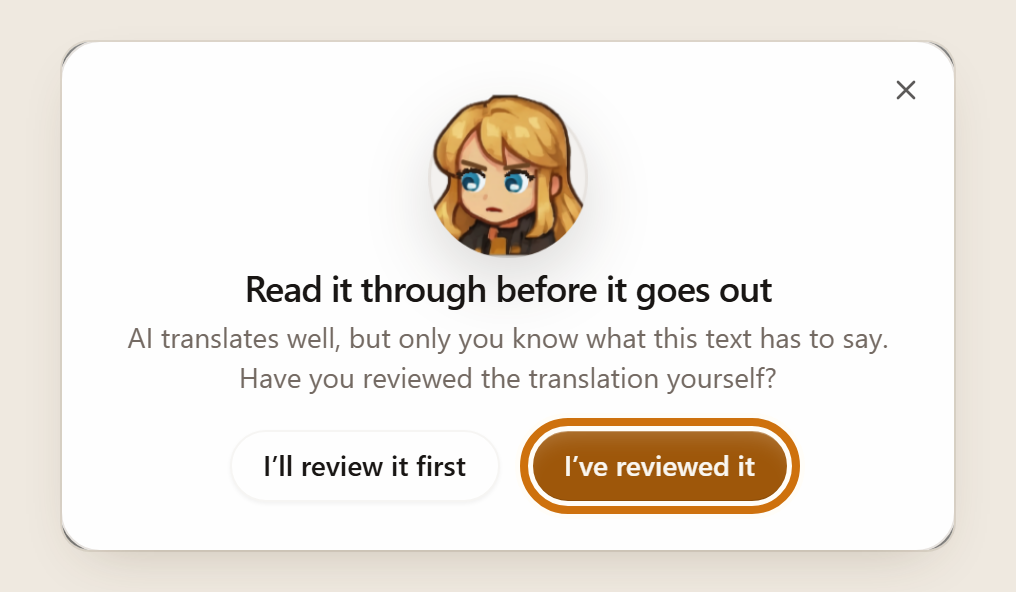
Literess’s reminder before an export: “Read it through before it goes out”, with the buttons I’ll review it first and I’ve reviewed it, the second outlined.
Before every export, Literess asks whether you read the translation through.
Originality report✦

Show your work, word by word

The people you write for are asking how AI was used. Every Transept document keeps the answer: what the AI drafted, what a person changed, and what a person checked. The originality report puts it on one page, so the work you did is visible next to the AI's.

  • Counted by word. The words the AI wrote, the words you changed and the paragraphs you wrote yourself, each counted on its own.
  • Every step on record. Translations, rewrites, fixes, your edits and your approvals in one list, each line marked as yours or the AI's.
  • Your sign-off, dated. Before the PDF downloads, Literess asks whether you read the translation through. Say yes and the report records it.

Two reports on the Free plan, unlimited on every paid plan.

Originality report

Chapter 3 · Ukrainian → English

PDF

Reviewed in full by the author, confirmed on Oct 21, 2026

Your data✦

What happens to your text

What happens to the text you translate in Transept
QuestionAnswer
Is it used to train AI?No. Not by us, and not by the AI providers we use.
What does an AI model see?Only the passage being worked on, for the length of that request. The providers (Anthropic, OpenAI, Google and others) are named on the security page, and none of them trains on it.
Who at Transept reads it?No one, in routine work. For a support case, we ask you to send us the document you need help with.
What do your logs contain?Technical events: the model, timing, cost and errors. The text of your documents is never written to them.
Where is it stored, and for how long?In Germany, on Hetzner's ISO 27001 data centre in Falkenstein, until you delete it. Deleting your account deletes your content.
Who owns the translation?You do. Our terms claim no ownership of your text or its translation.
What we won't do✦

Lines we don't cross

  • Promise that a text will pass an AI detector, or build anything to hide AI use.
  • Train models on your work, sell it, or share it with advertisers.
  • Apply Literess's changes without your approval, unless you turn on Allow All.
  • Claim ownership of anything you write or translate.
  • Open your documents without your permission.
Rules and declarations✦

When you have to say AI was used

EU AI Act. From August 2026, text that AI generated or changed and that is published to inform the public on matters of public interest has to be disclosed, unless a person reviewed it and someone holds editorial responsibility for it. Transept's review steps and the originality report help you document that review.

Amazon KDP. KDP counts a book translated with an AI tool as AI-generated, even after substantial edits, and asks you to declare it. Declare it. The report shows what you changed and reviewed, and it doesn’t replace the declaration. Our AI-detector test shows why a detector score is no guide either way.

Journals, universities and clients. Many accept AI help on condition that a person checks the result, and ask you to say how it was used. The report is a record you can attach.

This is general information, not legal advice. Whether a rule applies to your text is for you, and your publisher or client, to judge.

FAQ

  • No. Your documents are never used to train AI models, by Transept or by any AI provider we use, on any plan.
  • No, and we don't try. AI detectors guess, they also flag text people wrote, and we won't build a way to hide AI use. What we offer instead is a record of the work you did: what the AI wrote, what you changed, and what you reviewed.
  • It shows how the translation was made, from the record the editor keeps as you work: the share of words the AI wrote, the share you wrote or changed, the paragraphs you reviewed, and your dated confirmation. It is not a legal certificate, and it is not an AI detector.
  • Only if you turn on Allow All in her settings. Otherwise each change waits for your click. Either way, every change she makes is listed in the document's activity as the AI's.
  • The Originality panel is on every plan. The PDF report is included twice on the Free plan and without limit on Lite, Starter and Pro, and it costs no credits.
  • Write to support@transept.ai and tell us what worries you. Questions about how we use AI go straight to the founders.
Trust and control✦

Built for work you answer for

Private by default

Your text is never used to train AI, not by us and not by any provider we use, and it stays out of our logs. Delete your account and your text is deleted with it.

How we handle data

Security you can check

Hosted in Germany, in Hetzner’s ISO 27001-certified data center. Every sub-processor is listed, and a DPA is one email away.

All sub-processors

Give it context

Glossaries, styleguides, translation memory and per-string notes go with every request. You set them up once per project.

Glossaries

You’re the human in the loop

The AI drafts; you decide. Review every change side by side, keep or revert it, and send a review link when a client needs to look.

Review links

API, MCP and webhooks

The full API on every paid plan. Connect Claude or another AI assistant over MCP, or start runs from your own tools.

Developer guide

Something bigger?

Large catalogs, custom workflows, a DPA for procurement. Transept stays self-serve; write to us for the rest.

support@transept.ai
❧

Take the next 50-page job in half the time

No card · First 5 pages free

Featured on

  • Featured on Findly.tools
  • Featured on Wired Business
  • Featured on Twelve Tools
  • Find us on Firsto
  • Verified on DANG!
  • Launching soon on Smol Launch
  • Launched on Fazier
  • Featured on Startup Fame
  • Featured on LaunchBuff