MTPE Guide 2026: Human-First LLM Workflows That Save Time
How to run light and full machine translation post-editing so human judgment enters before and during generation, not just after the draft is done.

On this page
Traditionally, machine translation post-editing means letting a machine translate the full text, then handing the result to a human to fix errors, terminology, tone, and formatting. Light MTPE aims for a usable translation; full MTPE aims for publication quality.
That workflow made sense when machine output was obviously rough. LLMs changed the failure mode. Their translations can sound polished while hiding omissions, meaning drift, and weak contextual choices, and a finished draft can anchor the translator to the model's language.
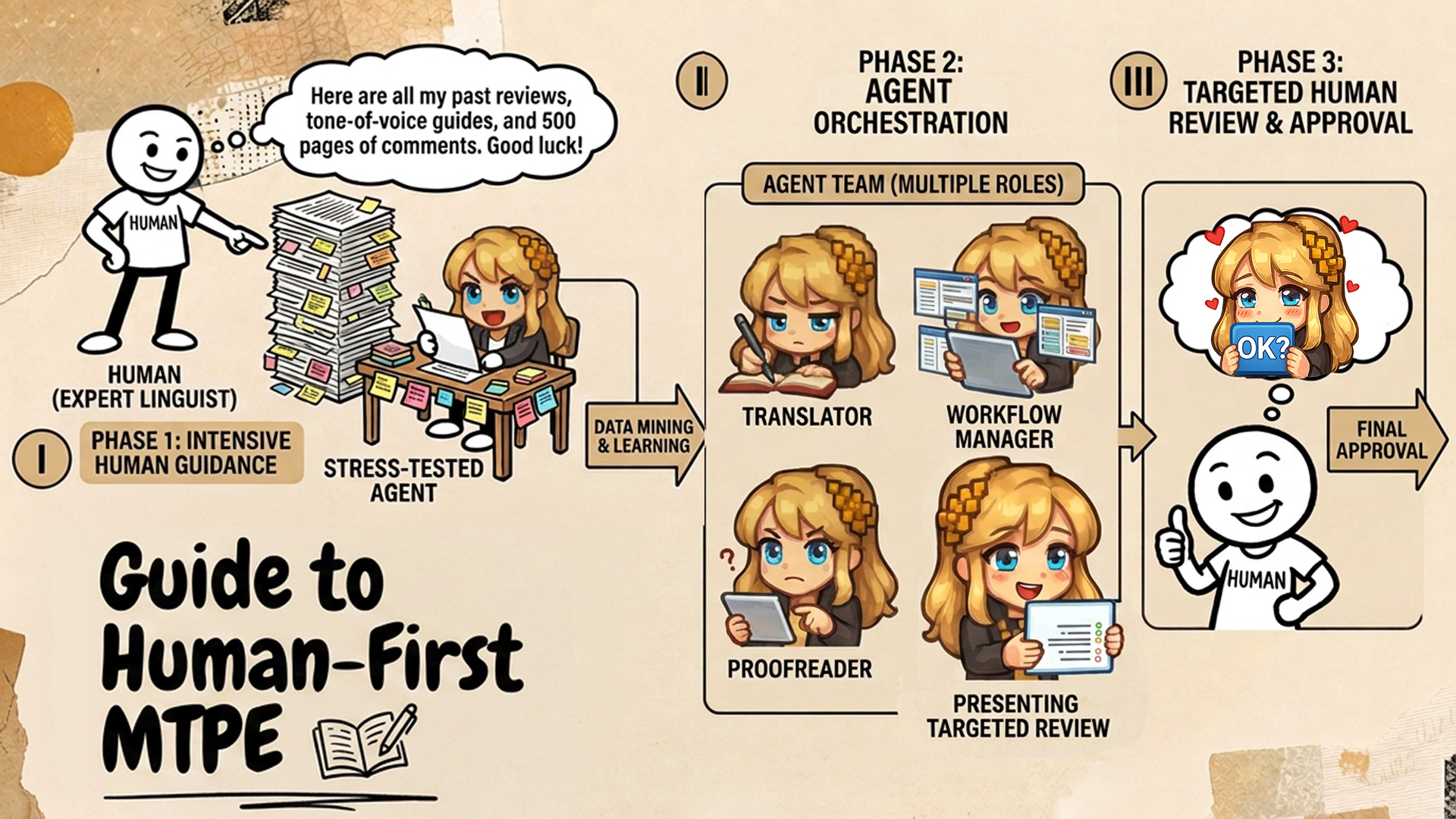
In modern MTPE, human judgment should enter before and during generation, not only after the draft is finished. Translators should guide the LLM with comments, context, translation memory, glossaries, and style guidance, then spend their time on the creative, cultural, and contextual decisions that actually require a human.
In this guide, I will explain how to run light and full MTPE workflows in a way that maximizes human impact and reduces wasted time. I will show it in Transept, as it's the most convenient tool for me, but you can recreate this in the tool of your choice.
Light vs. full MTPE workflows
In MTPE, you need to ensure your time is spent optimally to achieve the best quality. It's important to fight the temptation to do everything right; your job is to do enough.
As I explained in my research essay on MTPE, I believe that doing a full MT run, then editing the AI slop, is the wrong approach. With LLMs, there's a way to do it faster and funnier.
My strategy in Transept, depending on the text, is:
- Let the machine know what you want in advance.
- Let the machine do its best, then guide your attention to weak spots.
- Do a final polish based on auto-detected issues.
For commercial content, whether product or marketing, I spend roughly 80% of light MTPE time on steps 1 and 2 and only 20% on the final polish. By guiding the AI before and during generation, I minimize manual post-editing and turn the same upfront effort into a much larger volume of acceptable-quality translation.
Full MTPE follows the same workflow, but you devote more time to step 3: testing the document for weaknesses, refining its style, and adding the human creative touch required for publication-ready work.
Human-first light MTPE
This workflow focuses on getting most of the work done before the machine actually gets to work, so the output is as good as it gets.
1) Set up styleguides & glossaries
Styleguides and glossaries are essentially expanded prompts: they give the LLM explicit rules for tone, terminology, and usage.
We put a lot of work into making Transept follow them, so translators should fine-tune both until they reflect how they actually want the text to sound.
That's how I save time on light MTPE for, say, Transept's help center articles.
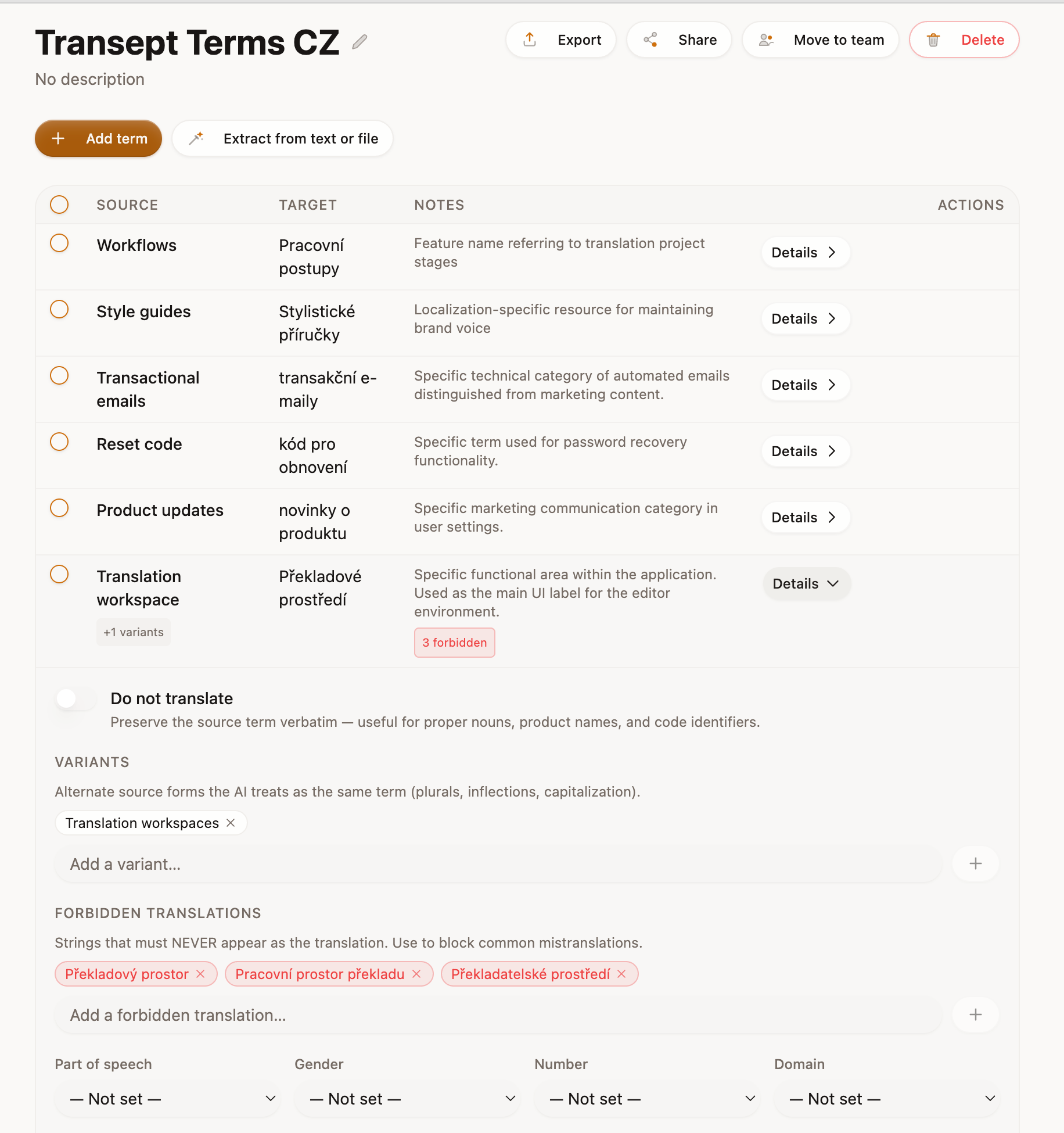
Usually, I reuse one of my existing styleguides and glossaries. But if the genre of the text is new, or I want to avoid any last-minute edits, I generate a new styleguide and glossary from the original text.
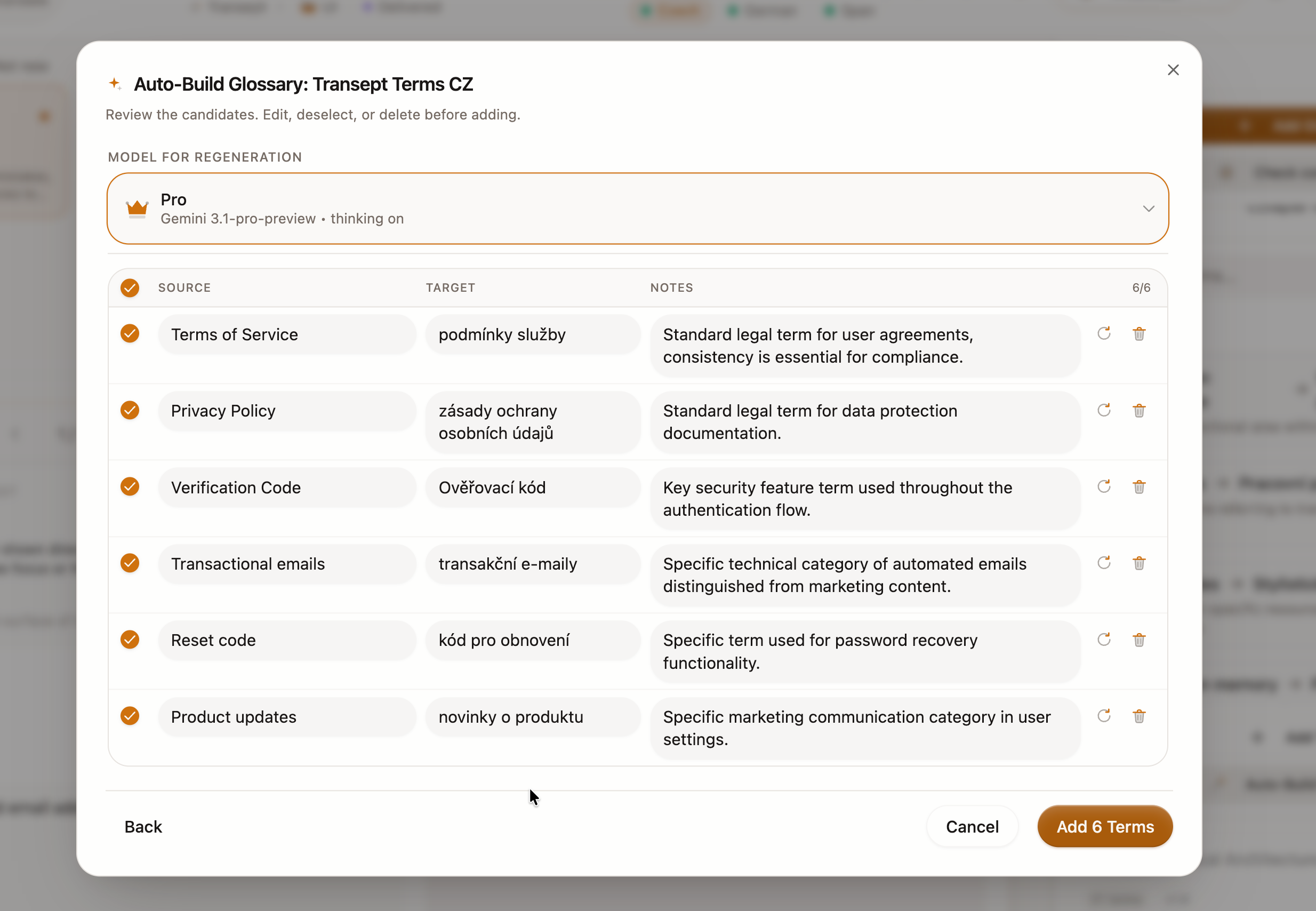
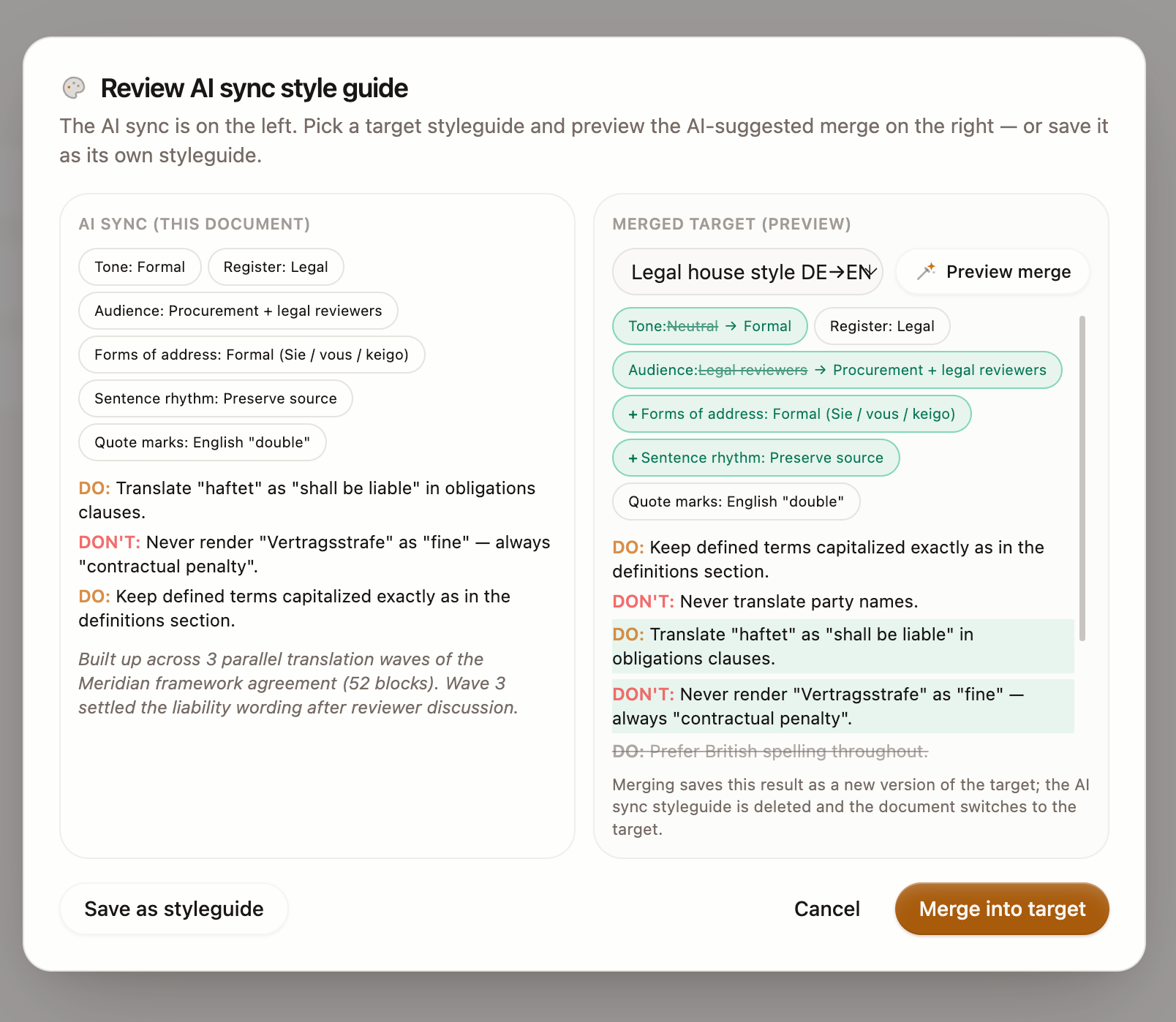
I rarely agree with AI's vision here, especially in fiction, so I edit the glossary and styleguide. I find it very rewarding to add notes and dos and don'ts when I do not have an opinion yet, just a gut feeling or vibe. When I need reassurance, I debate with Literess because she can consult dictionaries and look up my past decisions and debates.
2) Translate a seed page, post comments, and set context
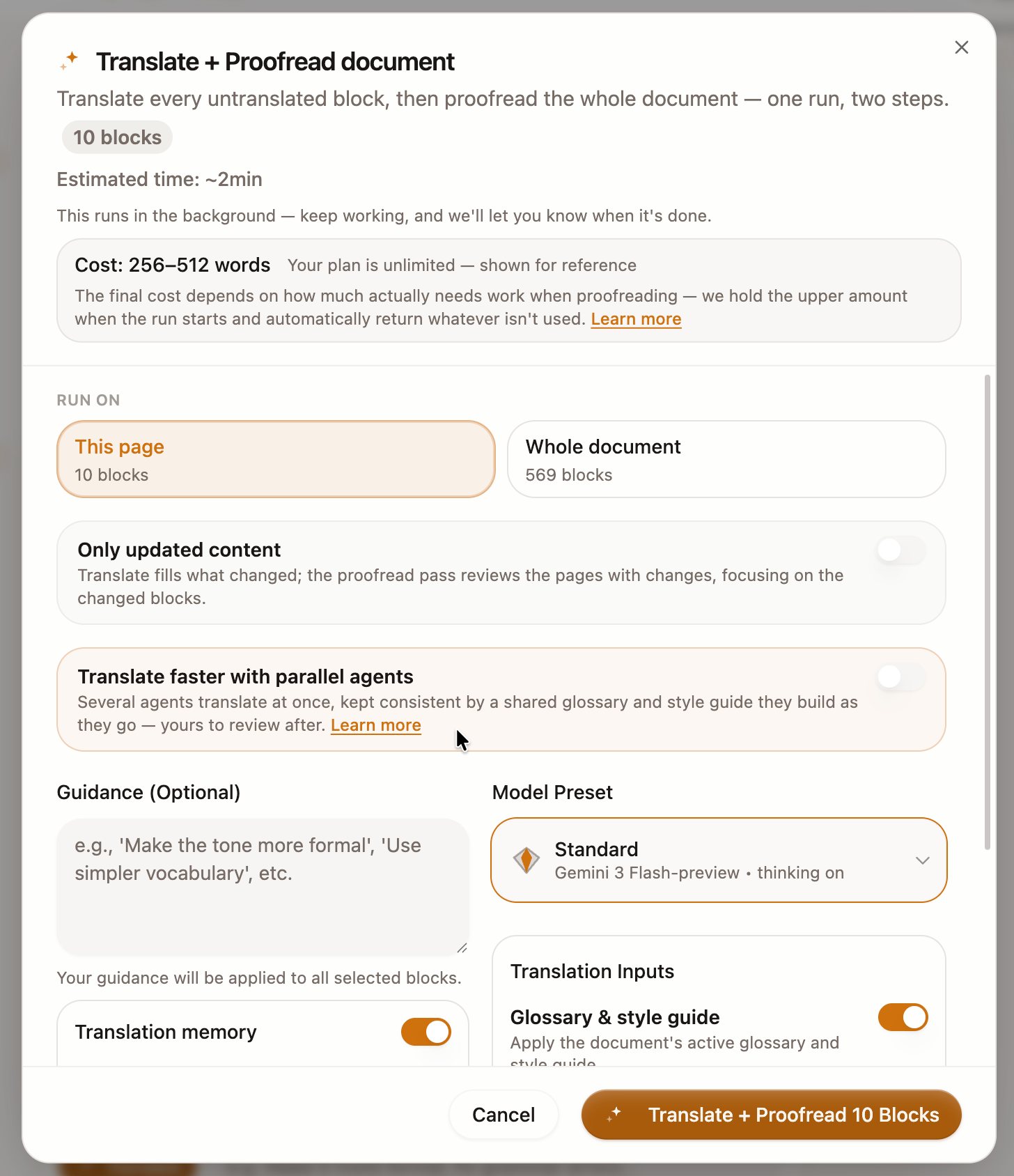
Then I generate only one page of machine translation. I use the "Translate + Proofread" workflow because it produces a draft and then tries to polish it, realistically showing the best LLMs can do with my inputs right now.
Then I leave comments on:
- What I like about the current translation.
- What is missing and what I just do not like.
- What direction I want the translation to take.
For easy texts, that's enough to seed the divine human touch. For more difficult ones, I like to ask the Literess agent to leave comments that mimic my logic.
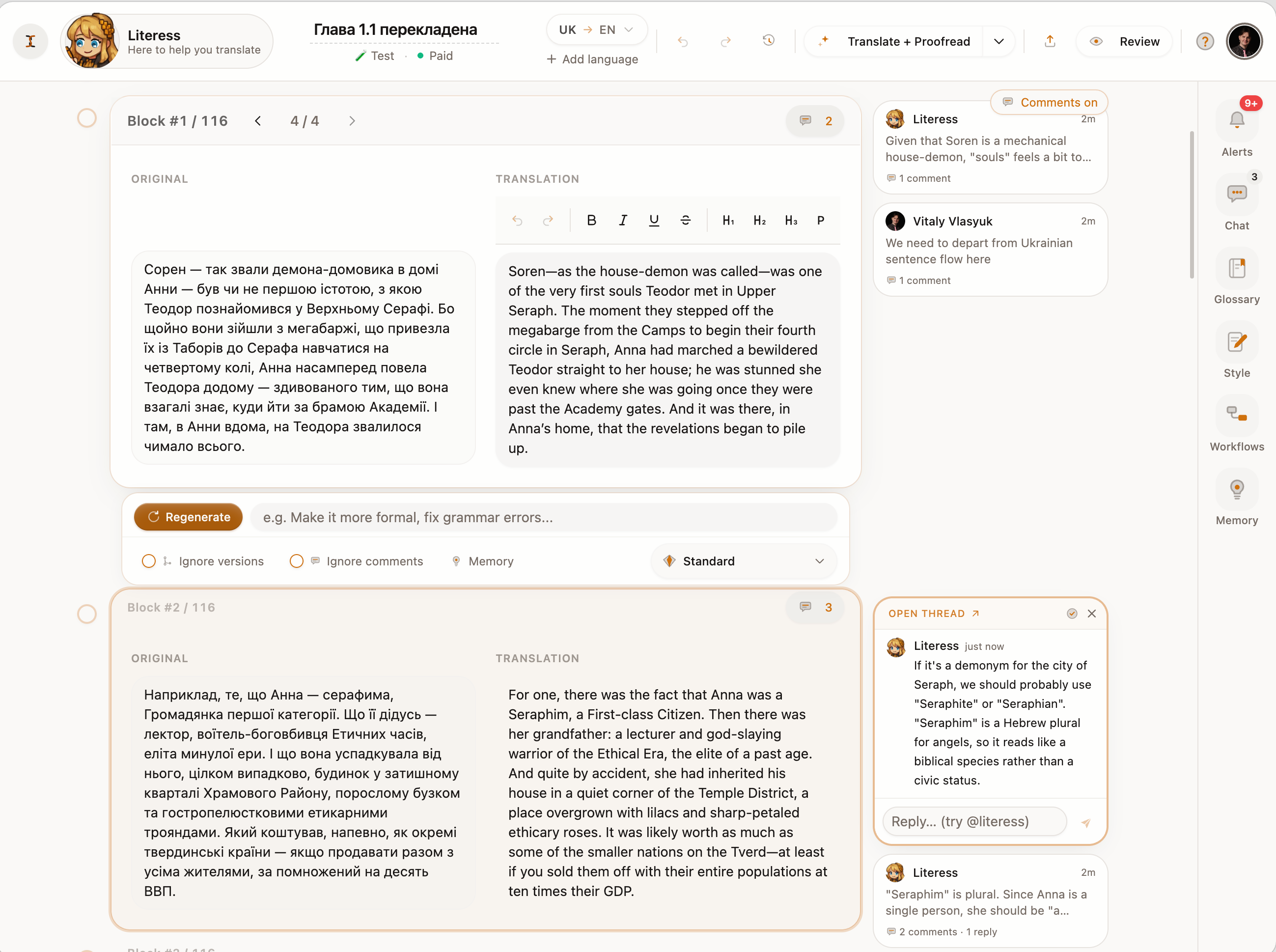
The way to verify that everything works as intended is to run another "Proofread" on the page. It will pick up the comments and generate a new, improved version of the page.
Usually, I get the quality I expect as a final result. In fiction translation, however, I sometimes need to leave an additional comment or edit whatever the styleguide got wrong.
3) Enable translation memory
Now we want to ensure that your comments and logic from page 1 also work on page 100. In Transept, this is achieved through translation memory, which carries not only past translations but also the comments around them and the before-and-after state of each translation.
It combines keyword matching with semantic search to retrieve past translations that use the same terminology or solve a similar contextual problem. We did a lot of work on that, and you can read our research on the state of the art in translation memory.
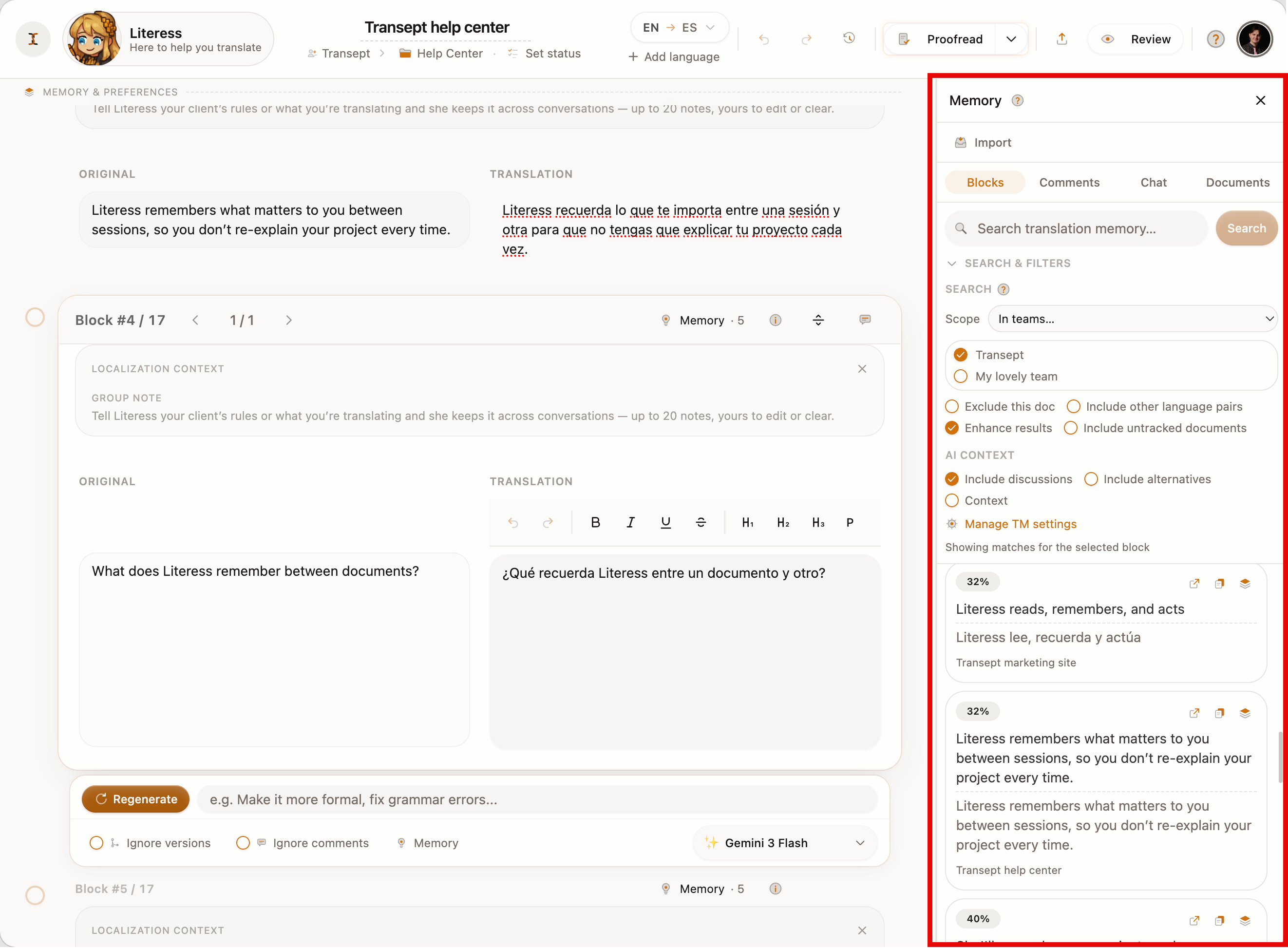
In Transept, there are two important nuances in how translation memory works.
- First, it's used even within the same document, so your relevant comments from other parts resurface during translation.
- Second, for improvement actions such as proofreading, memory automatically filters out unedited raw MT lines.
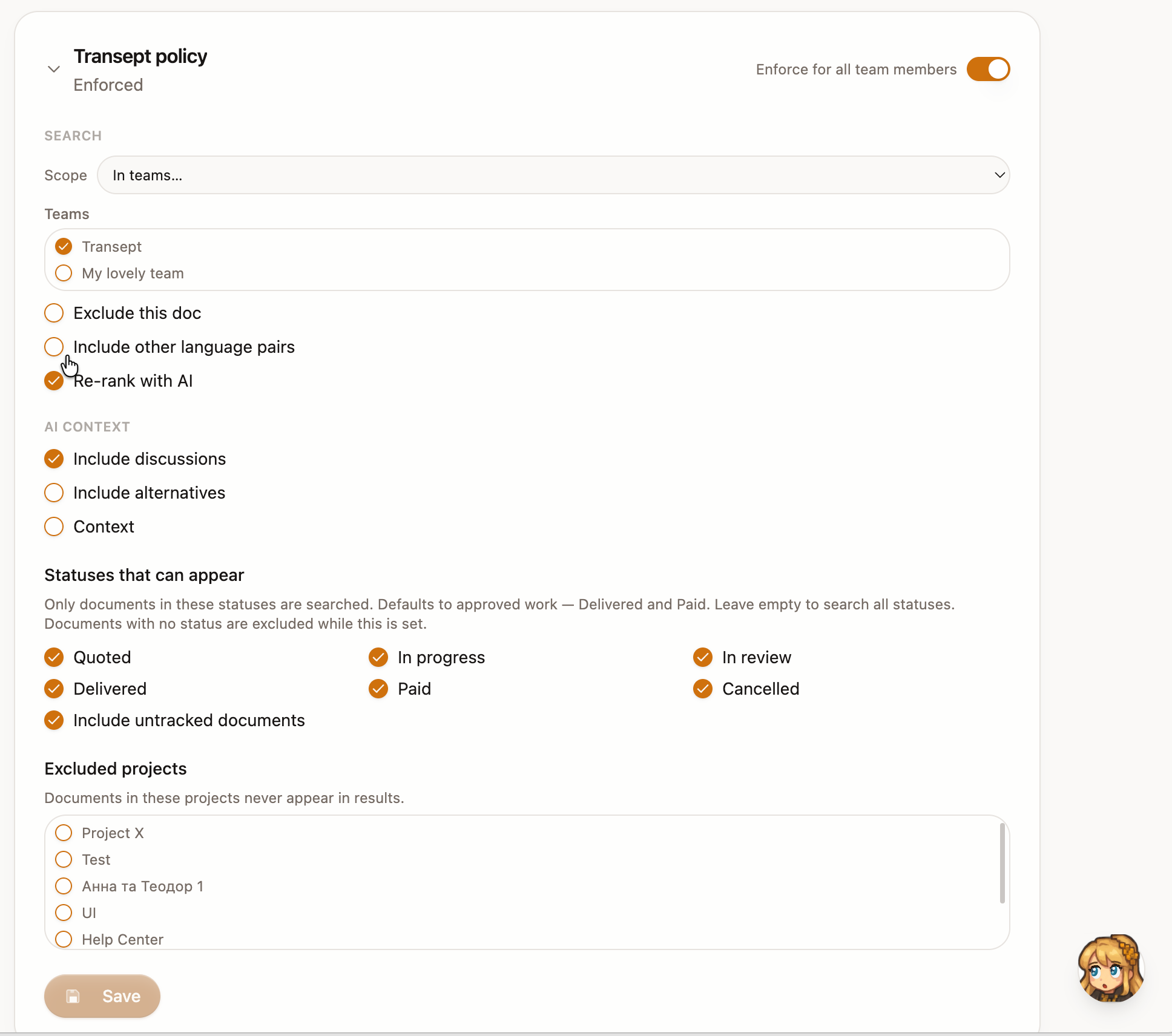
For light MTPE, it's worth ensuring that your current document is not excluded from translation memory search and that you've enabled AI reranking to surface nuance.
4) Run a translate-then-polish workflow
Now you've done everything you could to teach the LLM about your expectations. The only step left is to run the machine translation itself, which will pick up your comments and earlier iterations.
The best way to do it is with a workflow: a set of actions. A workflow can chain translation, proofreading, and targeted scans, as well as require human reviews of, say, character dialogue or legally binding clauses in the text. In Transept, you can build one yourself, as you would in Zapier or n8n, use a template, or ask Literess to build a custom one for you.
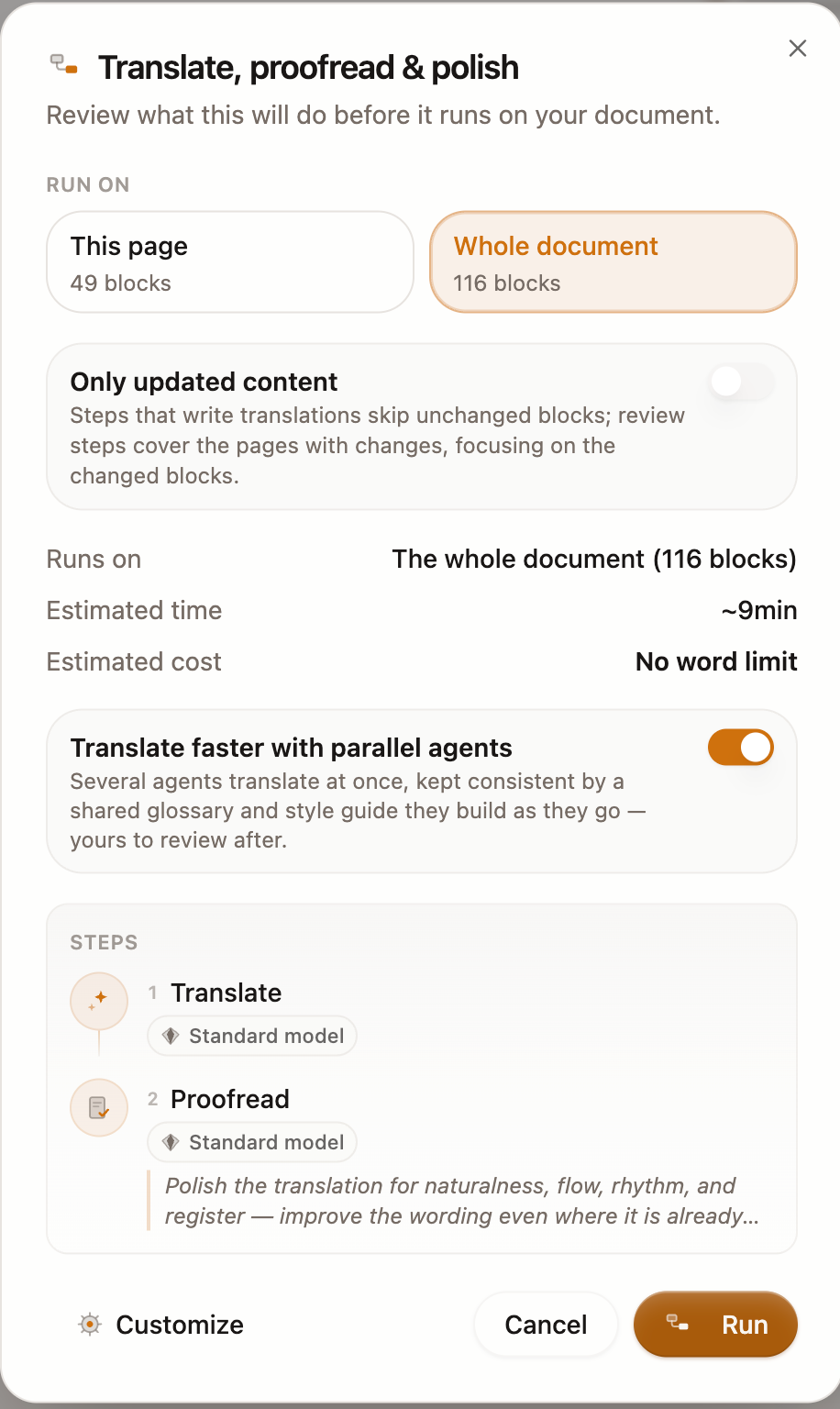
For light MTPE, a standard Translate + Polish workflow works best because:
- It runs a translation that automatically draws on translation memory, comments, styleguides, and glossaries.
- It then runs a proofreading agent that uses a strong model for decision-making and a Standard model for fixes. It uses translation memory too.
For a large text, like a novel or a white paper, I use parallel agents mode. This way, several AIs work in sync on different parts of the document, completing the work faster.
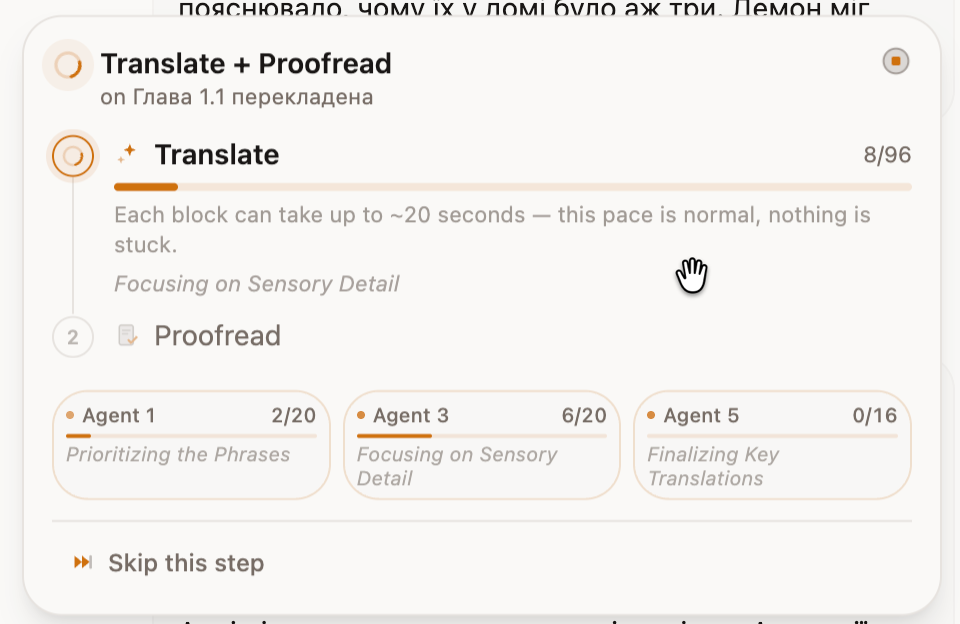
One thing to consider is that they will create interim glossaries and styleguides to complement yours, so even minor details stay synchronized. You can merge them into your main glossaries and styleguides later or discard them at will.
5) Do a guided final review
Here comes the part I like the most: LLMs helping humans with their superattentiveness and speed instead of trying to replace them.
After the MT is done, the first instinct would be to manually review the entire draft. And even though the styleguides, comments, and proofreading make the draft much better than a typical LLM translation, reading everything by hand would diminish the time savings.
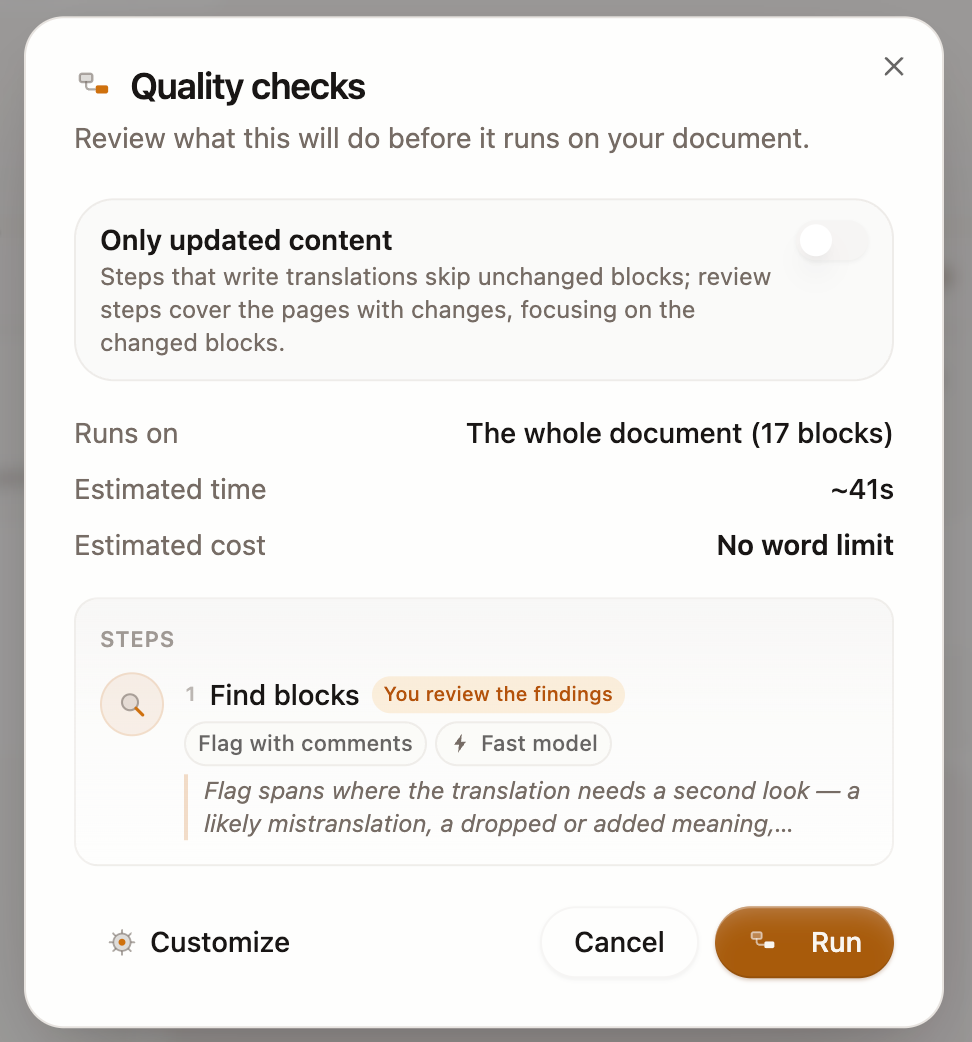
An alternative is to ask an LLM agent to review the draft and find specific weak spots or areas requiring attention. For terms and conditions, that might mean legally binding sections and exact terms. You could also ask it to find places where the original and the translation deviate or where the style drifts. If the agent has access to translation memory, styleguides, and glossaries, it can do wonders.
In Transept, there are three ways to run this review.
- Via the Review panel, you can specify what to find and select a review gate: a focused slide-by-slide mode, a whole-document review, or comments from Literess. You can make spot-on edits.
- In Workflows, you can plan and configure this review step right away. This technique secretly sits in the background of the Proofread action and acts as a filter. So you can, say, find all style deviations, have AI fix them, and only then review the text yourself.
- You can also ask Literess for help! Her strongest area is focused on-page iteration where creative decisions are made. She can also set up a workflow or a review for you, so you can skip the UI part.
Full post-editing workflow: improving on the baseline
Full MTPE starts from the same human-first foundation, but treats the light MTPE result as a baseline. From there, the work shifts to deeper testing, creative refinement, and publication-level QA.
It is still possible, though, to run a smarter full MTPE workflow instead of investing all your time in page-by-page reading.
1) Create a battery of guided reviews
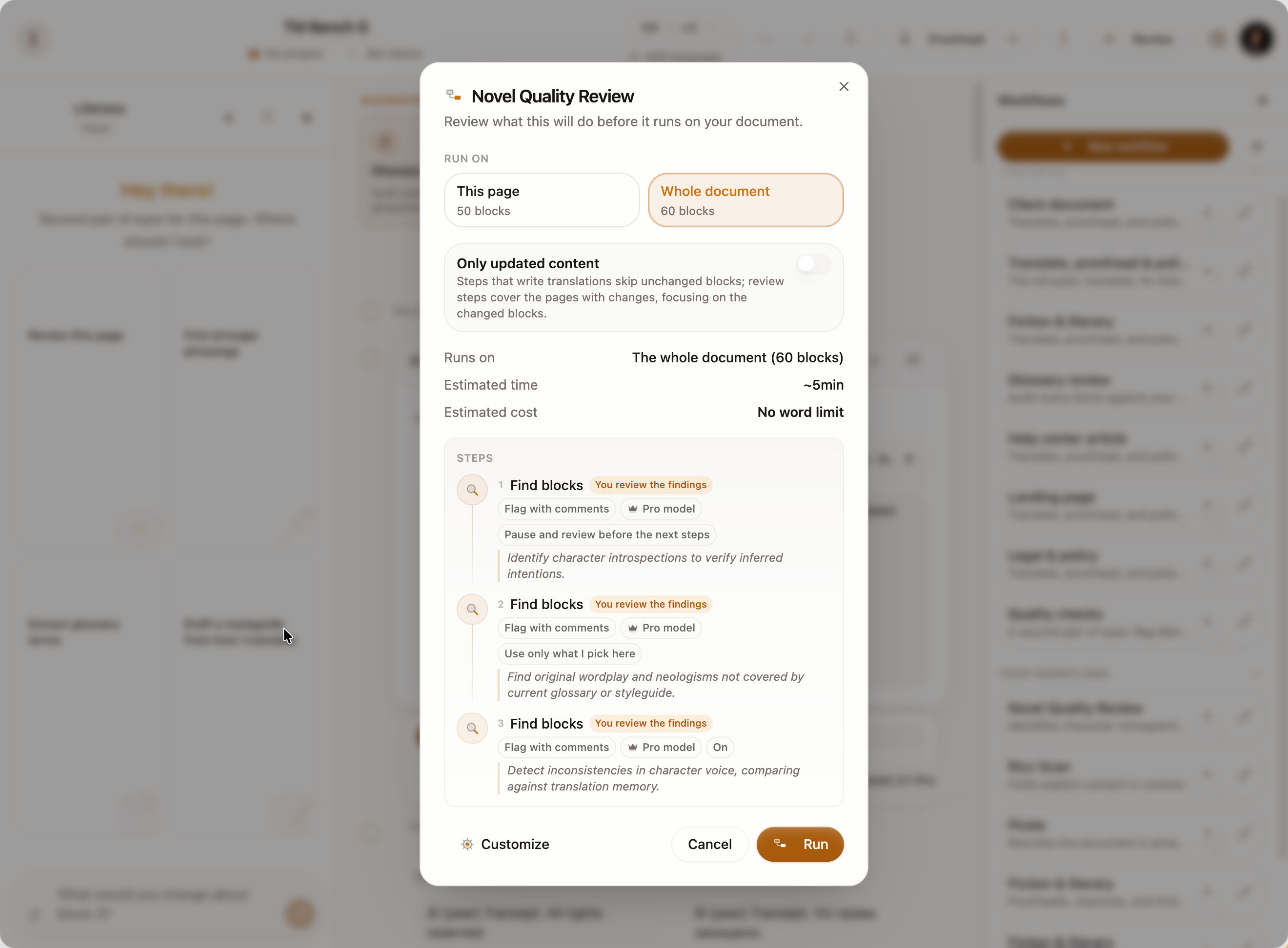
As I progressed with the translation of my novel, my AI-assisted review workflow turned into a series of rituals I needed to maintain my quality bar.
- I had AI find all character introspections to ensure that their intentions were inferred correctly, as the thoughts behind their speech were an important plot element.
- I also had it find all the original wordplay and neologisms that were not in the glossary or styleguide, so I could have the final say on whether they should be preserved.
- Finally, agents hunted for deviations in character voice. That was a tricky one, as they compared results from translation memory and had to flag cases where a character appeared to be speaking differently. Most of the time, those shifts reflected valid emotions, but sometimes the register change was noticeable only to me, a human.
I ended up with a workflow in Transept where all these analyses ran one by one while I worked my day job. I reviewed them on my phone and got a fully annotated version whose comments I could address afterward.
2) Find the best translation memory setup
With semantic search, advanced TM tools allow you to find translation segments with conceptual matches that are too weak for a human to reuse directly. However, they can still guide LLMs by showing them what you expect.
With extended memory context, as in Transept, you can make MTPE easier in the following ways.
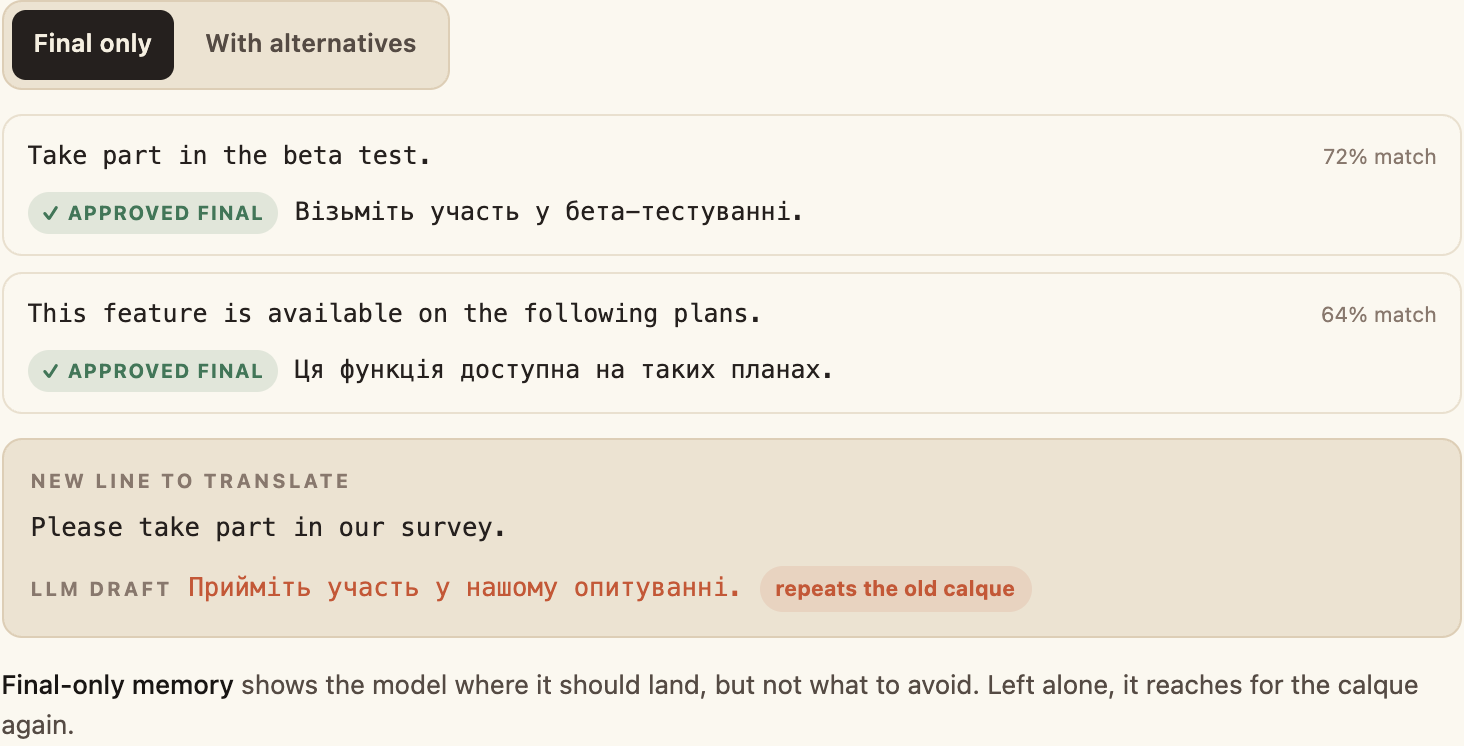
1. Include alternatives, meaning rejected machine or human drafts, in TM results. I found this especially useful when improving Ukrainian drafts of help center articles. Most of the human editing work here revolved around removing Russisms and restoring a natural flow. Given before-and-after examples, LLMs learned what constitutes the expected standard for Ukrainian in this context.
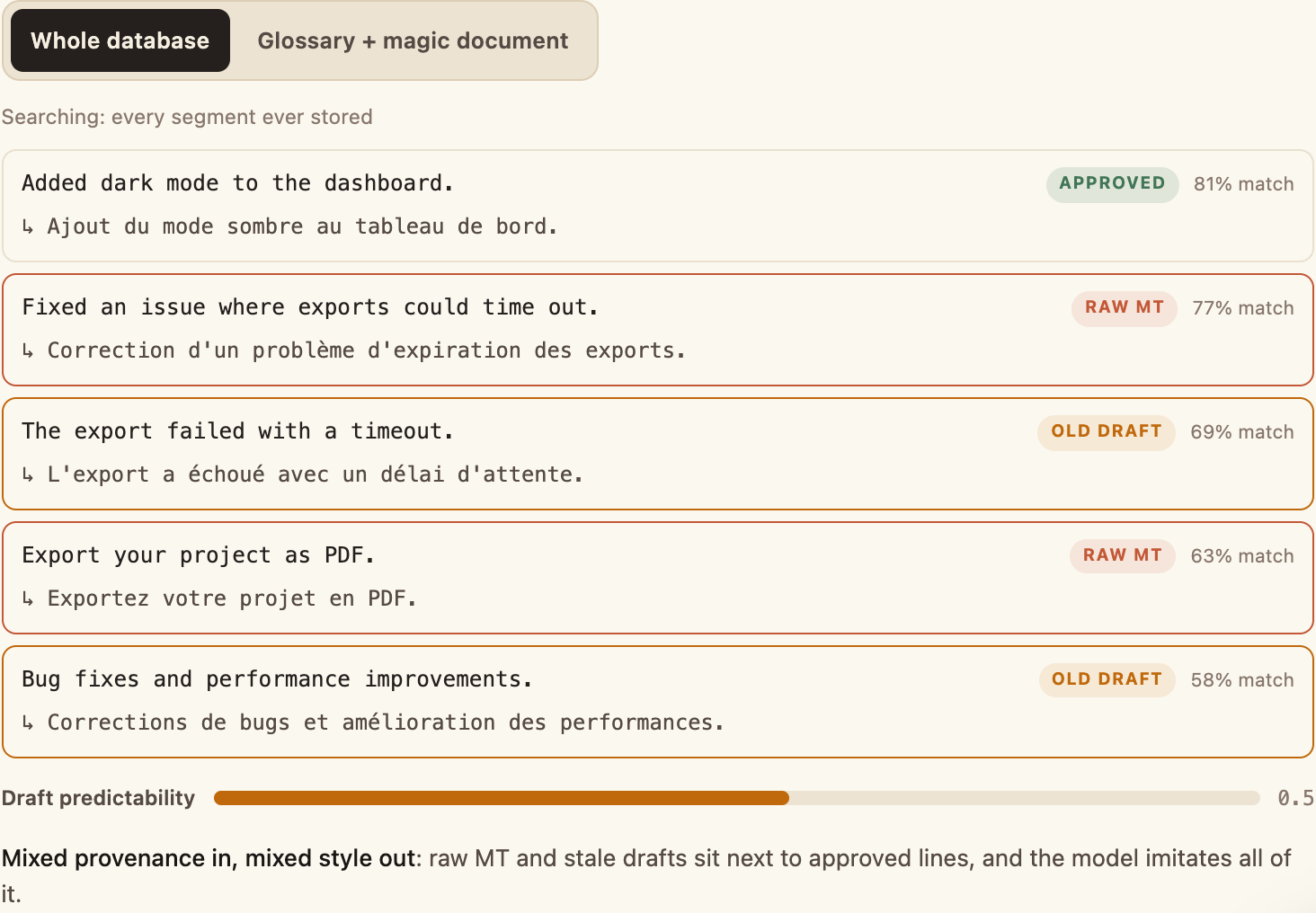
2. Find your magic document and use it. If you are translating recurring content, such as changelogs, you can combine a glossary with a set of the best translations in TM instead of using your whole database. With semantic matches, this setup establishes expectations for the LLMs and, once again, produces the best draft.
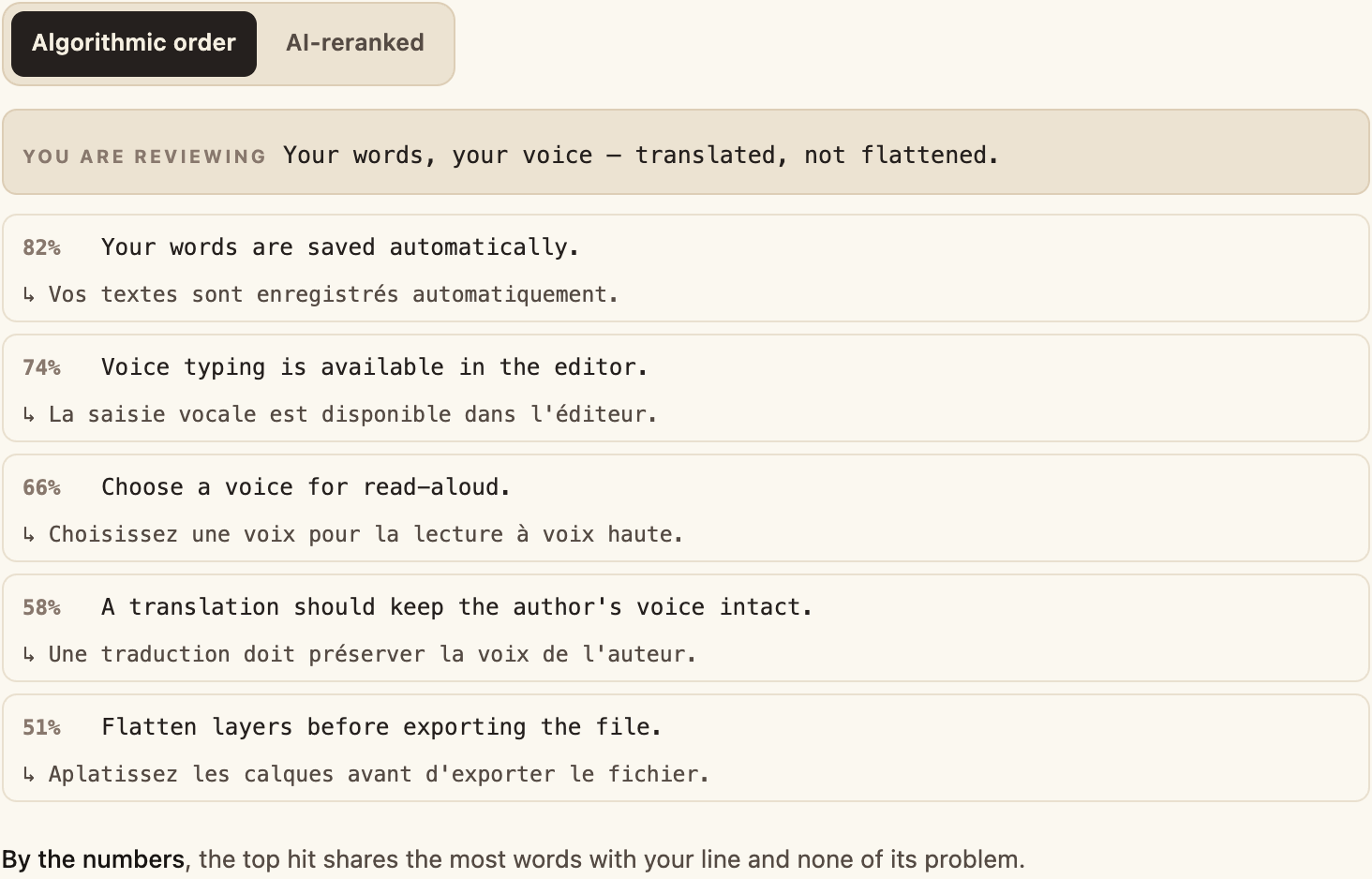
3. Use AI reranking during your manual review. AI reranking reads the memory results and pushes the most relevant ones up, even if the algorithmic match is weak. I usually review with the TM sidebar open, and with reranking, only the most human-relevant examples stay in view. It saves time scrolling through the results and figuring out what I need.
3) Build your Agent's memory about your personal preferences
The power of customization to your personal taste and preferences, beyond an agency's standards and the client's brand guidance, is deeply underrated. It is telling that people experiencing AI psychosis often had their ChatGPT memory fully loaded. That personalization gave even an older GPT-4o model enormous influence over them, having users riot to protect their model from being shut down.
In translation, you have countless personal quirks: your way of working and your own order of priorities. They are more than workflow steps. Some are so subtle that you may not even know all of them yourself.
While we are still working on a truly good memory model for AI agents, I often take time to talk to Literess about the work we have done on a document. I ask her to analyze patterns, argue with her about decisions, and then remember what we learned.
As simple as this technique is, it has helped me start each proofreading pass, improvement, and discussion about translating fantasy names not from zero, but from shared ground.
That's what I imagined Literess to be: a colleague and friend, a protégé, not a looming replacement that follows prompts blindly.
FAQ
What is machine translation post-editing (MTPE)?
Machine translation post-editing is the process of reviewing and improving a machine-generated translation until it reaches a defined quality target. Traditionally, the machine produces the full draft first, and a human corrects it afterward. In a human-first MTPE workflow, the translator also guides generation in advance with context, comments, glossaries, styleguides, and translation memory.
What is the difference between light and full post-editing?
Light post-editing aims for an accurate, understandable, and usable translation. It prioritizes meaning, omissions, and critical terminology without polishing every stylistic choice. Full post-editing takes the text to publication quality, including natural flow, consistent voice, cultural nuance, and stricter final QA. The workflow can stay the same; what changes is the quality bar and the depth of human review.
Does LLM translation still need human post-editing?
Yes. Fluent output is not necessarily correct output. An LLM can write natural-sounding sentences while dropping meaning, misunderstanding context, drifting from the required terminology, or flattening a distinctive voice. Human judgment is still needed to define what good means, guide ambiguous decisions, and verify the passages where mistakes carry real consequences.
When is MTPE worth it, and when should you translate from scratch?
MTPE is worth it when the machine produces a useful baseline and the post-editor can reach the target quality faster than by starting over. There is no honest universal savings percentage. Test representative content and track actual editing time. If you are rewriting most sentences, repeatedly correcting the same errors, or fighting the draft's structure, improve the model's context or translate that content from scratch.
How should MTPE quality be measured?
Measure quality against the text's intended use, not a single automatic score. Check source fidelity, omissions, critical errors, terminology, style consistency, editing time, and the number of issues found during QA. Automated metrics and AI reviews can help locate risk, but creative, cultural, legal, or brand-sensitive decisions still require a qualified human. In Transept, guided reviews, glossary- and styleguide-aware checks, and translation-memory references can focus that review on specific failure modes.
How can you scale human-first MTPE across many small documents?
Build the human judgment once, then reuse it. Create a shared glossary and styleguide, approve a representative seed translation, and let those decisions enter translation memory. In Transept, memory can search within a project or team and can include past discussions, alternatives, and surrounding context. Save the translation, proofreading, and guided-review steps as a reusable team workflow, then apply the same setup across the document backlog. Humans review exceptions and high-risk passages instead of re-explaining the brief for every file.
The author
Co-founder of Transept, writing as “Mevkh.” A Language and Literature degree, then a turn into software: senior AI engineer shipping production LLM features to 50,000+ users — RAG, agentic tools, LLM-as-judge evaluation. A novelist on the slow path, with 120,000 words of satirical romance fantasy in a drawer. The friction between AI translation and his own prose is what set this whole thing in motion.