Email localization: how to translate campaigns in every major ESP
Every email platform handles language differently. Some translate for you, some hand you empty locale slots, one leaves you writing conditionals by hand. Here is what Braze, Customer.io, Klaviyo, Mailchimp, Iterable and Brevo actually do, and how to translate the text without breaking your Liquid.

On this page
I run lifecycle marketing, so I have spent a fair amount of my life inside campaign editors, and email localization was the thing I kept underestimating. Translating a landing page is one job with one shape. Translating an email campaign is a different job in every tool you touch, because each platform decided separately what a "language" even is.
Some platforms translate the copy for you. Some give you empty locale slots and expect you to fill them. One expects you to write branching logic inside the email body. And underneath all of them sits the same hazard: your copy is full of template syntax that must come back from translation untouched, character for character, or the send breaks.
This guide covers what each major platform actually does, how to get the text out and back in, and the parts of the job that are the same everywhere.
Three ways an email platform handles language
Before the platform-by-platform detail, it helps to know which of three architectures you are dealing with. It determines your entire workflow, and it is usually not something you can change.
| Architecture | What the platform gives you | What you supply | Platforms |
|---|---|---|---|
| It translates for you | Machine translation inside the editor, per-language variants generated from your default | Review, corrections, a do-not-translate list | Klaviyo, Customer.io, Brevo |
| It gives you locale slots | Tagged content, variant scaffolding, a CSV or API round-trip | The translations themselves | Braze, Iterable |
| It gives you nothing | Merge tags and conditionals | Everything, written as branching logic in the email body | Mailchimp |
The middle row is where most serious multi-language programmes live, and it is the row this guide spends the most time on, because "the platform gives you an empty grid of locales" is precisely the moment a translation workflow has to exist.
Braze email localization
Braze is the tag-and-fill model, and it has the most distinctive syntax of the lot. You wrap each translatable piece of an email in a Liquid tag with an ID:
{% translation greeting %}Hello!{% endtranslation %}The general form is {% translation your_id_here %}default text{% endtranslation %}, and IDs must be unique within a message. There is an editor shortcut to wrap a selection (Cmd+Alt+L on macOS, Ctrl+Alt+L on Windows). Braze does not translate anything itself: you supply the translations by uploading a CSV or through the translations API, which at the time of writing is in early access.
The documented limits matter once a campaign gets real:
| Limit | Value |
|---|---|
| Translation tags per message | 200 |
| Characters per default text | 2,000 |
| Translations per locale | 409,600 bytes (about 409.6 KB) |
| Locales per workspace | 200 |
Nested translation tags are not supported. Locale comes from the user profile, configured under Settings → Localization Settings, either from the default language and country attributes or from a custom attribute; when both apply, the custom attribute wins.
Two Braze specifics are worth knowing before you start:
Wrapping a URL breaks click tracking unless the wrapped portion ends in ? or &. Braze documents the workaround directly:
<a href="https://{% translation id_1 %}example.com{% endtranslation %}?">Shop Now</a>Do not open the translation CSV in Excel. Braze's own documentation says to avoid it, because of display problems with non-English characters. This is the single most common way a Braze localization run gets corrupted without anyone noticing, and the cause is Excel rather than Braze: Excel guesses at CSV encoding and guesses wrong.
Braze's Content Blocks can carry their own translations, which is how you localize a shared footer once instead of in every campaign. Reference them as {{content_blocks.${your_block}}}; blocks inserted via Liquid stay linked and update automatically, while ones dropped in through the editor's dropdown do not. If a block has no translation for a given locale, it renders in its original language rather than failing.
If you would rather branch than tag, Braze supports the DIY route too:
{% if ${language} == 'en' %}
English content
{% elsif ${language} == 'es' %}
Spanish content
{% else %}
Fallback content
{% endif %}
Note that inside a Liquid tag the attribute is bare ${language}, while in body copy it is wrapped: {{${language}}}. Braze recommends always including the {% else %} branch, because some users have no language set, an unsupported language, or a device where language is undetectable.
Docs: Braze localization
Customer.io email localization
Customer.io took the opposite approach: localization is native, it lives in the message editor, and there is an AI auto-translate button. You build the message in a default language and add language variants without branching your campaign. It works across email, SMS, WhatsApp, push and in-app.
The language attribute is yours to name. Under Workspace Settings → Language settings you tell Customer.io which profile attribute holds the language, so it might be language, locale, or whatever your CRM already uses. Values must be either a two-letter code (en) or a language-region pair separated by a dash (en-US). Values are not case-sensitive, so es-MX and es-mx both work, but the dash is required.
Auto-translate covers body text, subject lines and preheader text. What it does not cover is the list worth pinning to your wall:
- Images, though it does translate alt text
- Email layouts in the rich-text and code editors
- Liquid static text, attribute values, and filter values
- Snippets
- Custom component text, unless you detach the component first
That third one deserves an example, because it is the sneakiest. Customer.io's own localization docs use this line:
Bonjour {{ customer.first_name | default:"ami" }}The word ami is the fallback shown to anyone with no first name on file. It is real, reader-facing copy, and it sits inside a Liquid filter, which auto-translate does not touch. Ship that to a German audience and a chunk of your recipients get greeted as ami. Every fallback string in every default: filter has to be translated per variant, by hand, and nothing in the interface will remind you.
Two more limits to plan around: translations are not updated automatically when you change the default template, and A/B tests with translations work on one-time sends but not on API-triggered broadcasts or automations.
Snippets deserve their own note. They are the reusable-content mechanism ({{snippets.your_snippet}}, 16 KB each by default), and auto-translate skips them. Customer.io's recommendation is to put the conditionals inside the snippet itself:
{% if customer.language == 'fr' %}
  Se désabonner
{% elsif customer.language == 'de' %}
  Abmelden
{% else %}
  Unsubscribe
{% endif %}
So a Customer.io programme usually ends up as native variants for message bodies plus hand-maintained conditionals inside every shared snippet. Worth knowing before you assume the AI button covers the whole surface.
Docs: Customer.io localization
Klaviyo email localization
Klaviyo's feature is called Smart Translations, and it machine-translates message content into 60+ languages from inside the campaign or flow editor. You enable it under Settings → Account → Translation with the "Translate messages" toggle. It requires a paid account and is not available on the free trial.
What Klaviyo documents as automatically translated is a specific list: text blocks, labels, and alt text. Subject lines are not on that list, so verify that in your account before assuming a campaign is fully covered.
Language resolution uses the profile's Locale by default, falling back to Country or Language if those are present instead. Klaviyo accepts BCP-47 codes (en-GB, es-ES) and also plain-text values like English or French.
Two things make Klaviyo pleasant to work with. The first is a Do Not Translate list: brand names, product names, and any term you never want a model to touch, specified once at the account level. Most platforms have no equivalent, and it is the difference between your product name surviving ten locales and it becoming ten different words.
The second is the per-element override menu. On any translated element you get Re-translate, Match source, Edit, and Ignore, and you can move between languages with the arrows at the top of the editor. That turns review into a pass over flagged items instead of a full re-read.
Klaviyo also supports a CSV round-trip, which is what you want if you have translators or an external tool. Under Translate → the actions menu there is Export CSV, in either Smartling or Simple format. The columns are block_id (the unique identifier for each translatable string), source (the original text), and one column per language named with its language code. The rules are strict and sensible: do not edit or delete block_id values, do not add rows, do not change the source values.
One thing that surprises people coming from Braze or Customer.io: Klaviyo is not Liquid. It uses Django template syntax.
{% if person|lookup:'Loyalty Points' > 150 %}
Hey VIP! You've always got free shipping & free returns
{% elif person|lookup:'Loyalty Points' > 0 %}
You have {{ person|lookup:'Loyalty Points' }} points, and you just need 150 to become a VIP!
{% else %}
Have you heard about our VIP program? Join today on our website to start earning rewards.
{% endif %}
The tags look close enough to Liquid to fool you, and then elif versus elsif ruins an afternoon. Personalization with a fallback reads as {{ first_name|default:'friend' }}.
Docs: Klaviyo Smart Translations · Django syntax
Mailchimp email localization
Mailchimp has no native multilingual campaign feature. What it has is conditional merge tags, and the documented approach is to write every language into one email and let the conditionals pick.
*|IF:MC_LANGUAGE=es|*
Spanish content here.
*|ELSEIF:MC_LANGUAGE=de|*
German content here.
*|ELSE:|*
Display English content for everyone else.
*|END:IF|*
*|MC_LANGUAGE|* holds the contact's language code and *|MC_LANGUAGE_LABEL|* the readable name. Mailchimp tries to detect language from the subscriber's browser; you can also set it per contact under profile → Settings → Language, or in bulk on import. Note that *|END:IF|* closes both IF and IFNOT blocks.
That single limit is usually what decides it. A localized email whose subject line is in the wrong language loses the open before the copy matters, so most teams running more than two languages on Mailchimp end up with per-language campaigns anyway, at which point the conditional-merge-tag approach has bought them nothing. Worth knowing at the planning stage rather than after building the template.
Docs: Mailchimp translate content
Iterable email localization
Iterable has a proper locales feature, and its documentation is refreshingly blunt about what that does and does not mean:
Locales do not translate content.
You get variant scaffolding; you bring the translations. What you get in return is that all variants share one templateId, so your metrics stay unified instead of fragmenting across ten separate templates. For anyone who has tried to report on a campaign split into per-language copies, that alone is worth the setup.
The field must be named exactly locale. Iterable is explicit that if you call it languagePreference or anything else, it cannot match users to variants. Locale names follow ISO-639 plus ISO-3166 (fr-CA, fr-FR), three-letter codes are supported, and locales cannot be renamed after creation, so decide your naming convention before you make twenty of them. A blank locale gets the default localization; a mismatch is governed by a project-level setting that chooses between skipping the send and sending the default.
Iterable also explicitly discourages the DIY route:
While Iterable is a flexible platform and you may be able to create content in multiple languages using Handlebars or Catalog, these are not best practices for localization.
Templating is Handlebars, and field names are case-sensitive. There is one quirk that will bite you in the WYSIWYG editor: conditionals have to be wrapped in HTML comments or the editor breaks them.
<!--{{#if activeUser}}-->
    <div>Hi active user!</div>
<!--{{else}}-->
    <div>Hi inactive user</div>
<!--{{/if}}-->
For the round-trip, GET /api/templates/email/get pulls template content out for translators.
Docs: Iterable multiple languages
Brevo email localization
Brevo sits with the platforms that translate for you, and it is the most direct competitor to Mailchimp on this specific feature. You create one campaign that adapts to the language or country code on the contact, click Add languages, and Brevo duplicates the campaign per language for you to translate, manually or with Aura, its AI assistant.
What you can vary per language is broader than most: sender name, subject line, preview text, and the email design itself, plus reply-to, Google Analytics tracking, and a custom unsubscribe page. The subject line is the notable one, given it is exactly what Mailchimp cannot do.
The documented limits: file-based translations are not supported (so no CSV round-trip, which rules Brevo out if you work with an external translation vendor), it does not work with A/B test campaigns, and saved sections need one per language. Contacts whose language attribute matches nothing configured receive the default version.
Docs: Brevo multi-language campaigns
Liquid, Handlebars and merge tags: the parts that must survive
Whichever platform you are on, the actual translation step has one hard requirement. Your copy contains template syntax, and every character of it has to come back exactly as it went in. A translated {% endif %} is a broken send.
Here is what the syntax looks like across the platforms in this guide:
| Platform | Language | Personalization | Conditional |
|---|---|---|---|
| Braze | Liquid | {{${first_name}}} | {% if %} / {% elsif %} / {% else %} / {% endif %} |
| Customer.io | Liquid | {{customer.first_name}} | {% if %} / {% elsif %} / {% else %} / {% endif %} |
| Klaviyo | Django | {{ first_name }} | {% if %} / {% elif %} / {% else %} / {% endif %} |
| Mailchimp | Merge tags | *|FNAME|* | *|IF:X|* / *|ELSEIF:X|* / *|ELSE:|* / *|END:IF|* |
| Iterable | Handlebars | {{firstName}} | {{#if}} / {{else}} / {{/if}} |
| Brevo | Brevo Template Language | {{ contact.FIRSTNAME }} | {% if %} / {% else %} / {% endif %} |
Three failure modes account for nearly everything that goes wrong here.
The model translates the token. You get {{ prénom }} back, or {% si %}, and the send fails or renders the literal text. Any tool worth using masks tokens before the text reaches a model and restores them afterward, so the model never sees them as words.
The model moves the token. Word order legitimately changes between languages, so a token should move. The problem is when it moves into the wrong clause, or an {% if %} and its {% endif %} end up in a different order. Position is meaningful; the fix is to check that the set of tokens coming out matches the set that went in, and to re-run the block when it does not.
The token count changes. A dropped token is the dangerous one, because the email still renders, just with a missing name or a missing branch. This is why counting matters more than eyeballing.
And the rule that covers all three: conditional branches are separate strings. In this line, there are two independent pieces of copy, and a translator or model handed the whole thing as one blob will do a worse job on both than one handed each separately with context:
{% if ${loyalty_tier} == 'gold' %}Gold members get an extra 10%.{% else %}Join Gold for an extra 10%.{% endif %}HTML emails and string tables are two different jobs
There is a fork in this road that decides your whole setup, and people usually discover it halfway through.
Some email content is a document: an HTML template, a rendered email, something with structure and flow that reads top to bottom. You want it translated as connected prose, because the headline and the body under it belong together, and a translator who can see both makes better decisions than one shown either alone.
Other email content is a string table: a keyed list where every row stands alone. cta_button, subject_line, footer_unsub. These come with metadata that matters more than the prose does: a key that must never change, a context note, and often a character limit, because a subject line that runs long gets cut off in the inbox.
Braze CSVs, Klaviyo CSVs, and every localization file format from the software world (gettext PO, XLIFF) are string tables. Your HTML templates are documents. Treat a string table as a document and you lose the keys; treat a document as a string table and you shred the prose into disconnected fragments.
This is why we built strings-file support in Transept as its own path rather than folding it into document import. A CSV of email copy comes in as a grid: key, source, translation, with the character limit rendered as a live counter and the context note attached to each row.
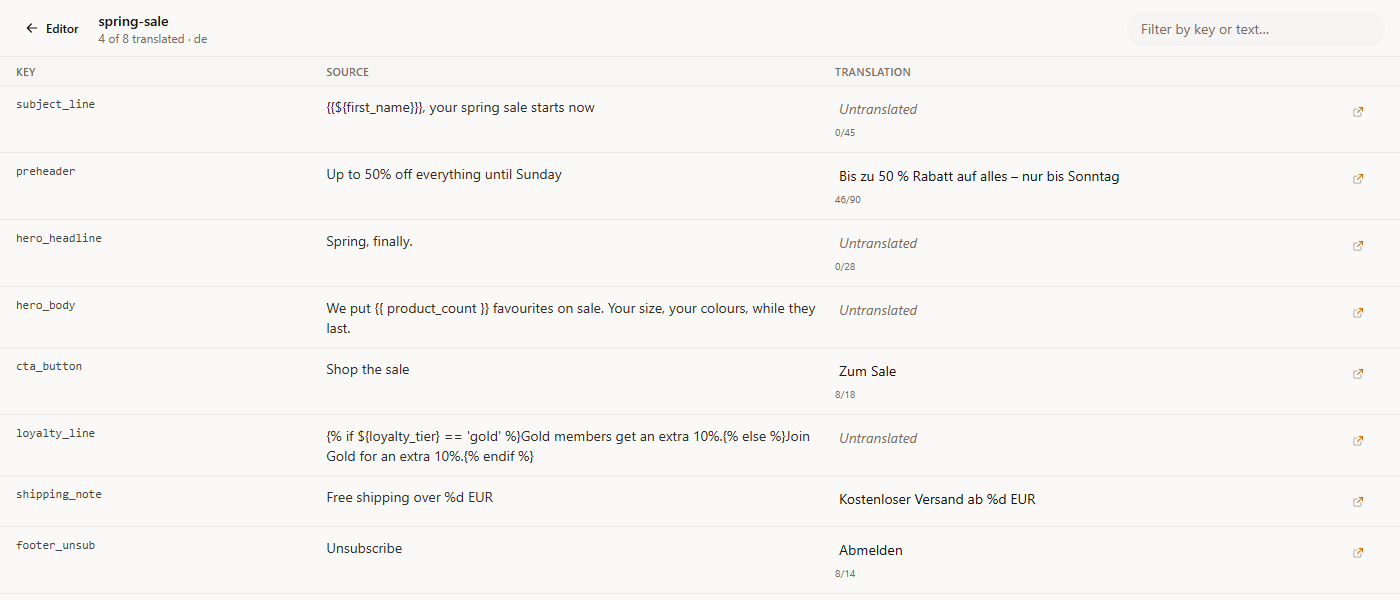
The important property is that the file goes back out in the shape it arrived in. You export the original file, translated, with your keys and your columns where the platform expects them, rather than exporting something you then have to reshape by hand.
What we found building email support into Transept
We shipped string-file import for exactly this workflow, and the process turned up things I have not seen written down anywhere. These are our own findings, from our own code and test runs.
"50% off" is a printf conversion, technically
Software strings often use printf placeholders: %s, %d, %1$s. If you are masking those before translation, the obvious regex accepts printf's full flag set, which includes the space flag (% d prints a space before positive numbers). It is legal printf, and accepting it is defensible.
It is also a disaster for marketing copy. With the space flag accepted, 50% off contains a match: % o parses as a space-flagged octal conversion. So does 100% organic. So does Up to 70% off, which is the single most common construction in promotional email.
We ran it both ways:
| Input | Strict pattern | With the space flag |
|---|---|---|
50% off your first order | no match | % o |
100% organic cotton | no match | % o |
Hi %s, you saved %d%% | %s, %d, %% | %s, %d, %% |
Masking % o turns your discount line into a placeholder and hands the model a mutilated sentence. We refuse the space flag deliberately, and lose nothing: no real string table uses it.
Braze's personalization tag has three closing braces
This one we found while writing this guide, which is a good argument for writing guides.
Braze's syntax is {{${first_name}}}. Count the closing braces: the attribute's own }, then the two that close the Liquid output tag. Three in a row.
Almost every Liquid tokenizer scans non-greedily to the first }}. Against {{${first_name}}} that closes one brace early: it captures {{${first_name}} and leaves a bare } sitting in the translatable text. The token looks handled. The stray brace goes to the model as prose, and comes back moved, duplicated, or gone.
{{${first_name}}}, your spring sale starts now

  non-greedy scan  →  token: {{${first_name}}     leftover: "}, your spring sale starts now"
  brace-aware scan →  token: {{${first_name}}}    leftover: ", your spring sale starts now"
Ours did the first thing. We found it, fixed it to allow one level of nesting inside the token, and added Braze's exact syntax to the test suite. If you maintain your own email tooling, test it against {{${attribute}}} specifically, because the plain {{ attribute }} form works fine and hides the bug completely.

Quotes inside placeholders break JSON replies
When you send a batch of strings to a model and constrain the reply to JSON, an unescaped " inside a reply string closes the string early and drops the rest of the batch. We hit this with placeholders that carried quoted attributes, and reproduced it on roughly 58% of runs with one model.
The fix is not better escaping instructions in the prompt. It is to make the wire format quote-free, so the failure cannot occur: the model only ever sees placeholders without quotes, and the quoted canonical form is restored afterward. Prompting a model not to break JSON works most of the time, which is the worst possible reliability profile, because you will not notice the failures.
Fuzzy entries are a signal, not a translation
If your strings come from gettext PO files, entries carry a fuzzy flag meaning "this was auto-matched, a human has not confirmed it." Treating fuzzy entries as finished translations imports a pile of guesses as approved work.
We exclude them from seeding, translate them fresh, and drop the fuzzy flag on the way back out, because by then the entry has been reviewed and the flag is no longer true.
Best practices for localizing email campaigns
The habits that separate a smooth programme from a painful one, in rough order of how much grief they save.
Decide your locale codes once, at the profile level. Two-letter or region-qualified, and consistent everywhere. Most "the translation did not show up" incidents are a nl-BE profile meeting an nl message.
Write context for every string before it goes anywhere. A translator seeing Shop the sale in a spreadsheet has no idea whether it is a button, a heading, or a link, or that it has eighteen characters to fit in. Every platform that offers a context or description field is asking you for the thing that most improves output quality, and almost nobody fills it in.
Respect character limits as a first-class constraint. German runs about 1.5 to 2 times the width of English. A CTA that fits in English will overflow, and a subject line that fits will truncate mid-word in the inbox. Carry the limit with the string so whoever translates it can see the counter.
Keep a do-not-translate list. Product names, brand terms, feature names. Klaviyo has this built in; on other platforms it lives in your glossary. Either way, write it down before the first run, not after you have found your product name in six variants.
Translate the fallbacks. Every default: filter, every {% else %} branch, every "Hi there" that shows when the name is missing. These are the strings that never appear in a preview, so they never get reviewed, and they go out to the recipients you know least about.
Reuse your decisions across sends. Campaign copy repeats constantly: the same footer, the same unsubscribe line, the same seasonal framing every year. A translation memory means you settle "Shop the sale" once and it holds across every campaign after, instead of drifting into three variants because three different runs made three different calls.
Test-send in every language before the real send. Render the actual template with a real profile in each locale. Conditionals that look right in the editor fail in ways only rendering reveals, and this is the step that catches an untranslated fallback or a broken branch while it still costs nothing.

Frequently asked questions
What is email localization?
Email localization is the process of adapting an email campaign to another language and market: the copy, the subject line and preheader, the personalization fallbacks, and the formatting conventions of the target locale. It differs from plain translation because an email carries template syntax (merge tags, Liquid or Handlebars conditionals) that must survive unchanged, along with constraints like subject-line length that the translation has to respect.
Which email platforms translate campaigns automatically?
Klaviyo (Smart Translations, 60+ languages), Customer.io (AI auto-translate on email, SMS, WhatsApp, push and in-app) and Brevo (via its Aura assistant) generate translations inside the editor. Braze and Iterable provide locale scaffolding but expect you to supply translations. Mailchimp has no native multilingual campaign feature and relies on conditional merge tags.
Can I translate a Mailchimp subject line?
No. Mailchimp's documentation states that translating the subject line is not possible, because conditional merge tags do not run in the subject field. To send localized subject lines through Mailchimp you need one campaign per language, segmented on the contact's language field.
How do I stop a translation from breaking my Liquid tags?
Mask the tokens before the text reaches a translation model so it never sees them as words, then restore them afterward, and verify that the set of tokens in the output matches the input before accepting the result. Translating each conditional branch as its own string, rather than handing over the whole {% if %}...{% endif %} line as one blob, also improves quality because each branch gets translated as the standalone sentence it is.
What is the difference between an HTML email and a string table?
An HTML email is a document: connected prose with structure, best translated as a whole so context carries between headline and body. A string table is a keyed list where each row stands alone, carrying a key that must never change, usually a context note, and often a character limit. Braze and Klaviyo CSV exports, gettext PO files and XLIFF are all string tables. The two need different handling: treating a string table as a document loses the keys, and treating a document as a string table fragments the prose.
Should I use CSV export or the platform's API for translations?
CSV is the practical choice when a human or an external vendor does the translating, and it is what Braze and Klaviyo document. An API round-trip is better when the process repeats on a schedule or the volume is high enough that manual file handling becomes the bottleneck. Braze offers a translations API (in early access at the time of writing) and Iterable exposes template content through GET /api/templates/email/get. Brevo supports neither: it has no file-based translation, so campaigns must be translated in the interface.
How many languages can a single email campaign support?
It depends on the platform. Braze allows up to 200 locales per workspace and 200 translation tags per message. Klaviyo covers 60+ languages through Smart Translations. Customer.io accepts several hundred language and language-region codes. In practice the constraint is rarely the platform limit; it is how many languages you can keep reviewed and current as the source copy changes.
The author
Co-founder of Transept. Three degrees in English Language and Literature — Kyiv, Ostrava, and a year in Salzburg — and a Ukrainian native who lives most of her writing life in English. Came into AI as a prompt engineer, then product and lifecycle marketing. She writes semi-fictional stories about real people, and keeps circling the question of what gets lost between languages.