Review & deliver
Share with a reviewer, not a team
A read-only or comment-only link your client, editor, or external reviewer opens in their browser. No account to create, no software to install. They see the translation; they leave comments; you see them in the editor.
Free to begin · No card required
External review is where most translation workflows break down. The client doesn’t have a license to your translation tool. The editor doesn’t want to create yet another account. The reviewer’s only request is "send me the doc so I can leave comments". Client review links solve all three: a per-document signed URL that opens in any browser, with a clean side-by-side view of source and translation, optional commenter name, expiry if you want one. The reviewer reads, comments, and you see their feedback in your workspace next to the editor — no DOCX round-trip, no version-control overhead.
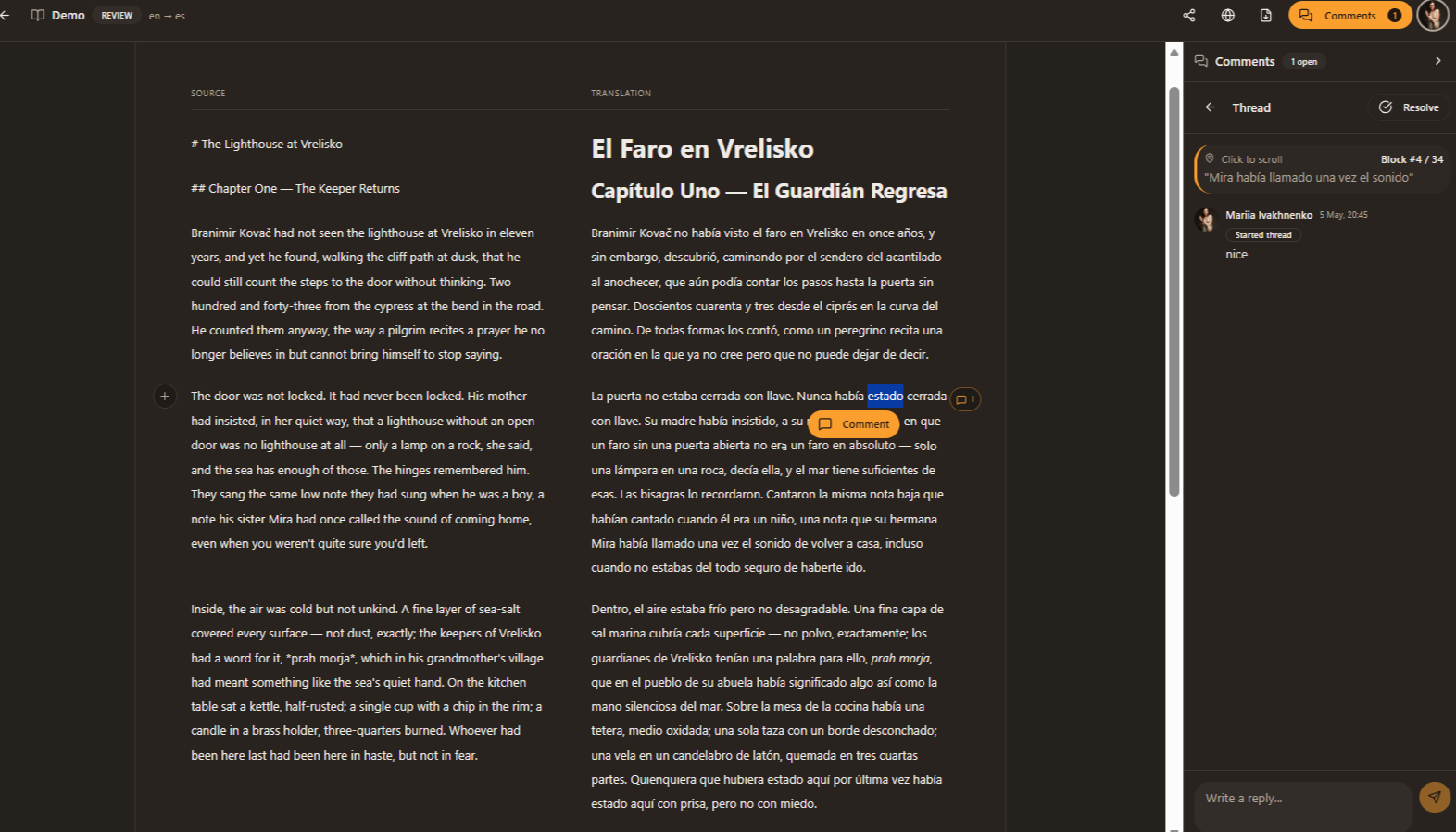
A link, a browser, a clean review
External review is where most translation workflows break down. The reviewer doesn’t have a license, doesn’t want a login, and the file you send doesn’t track their changes. Client review links solve all three.
Generate a share link
From any document, share → public review. Pick read-only or comment-only. Set an expiry if you want one.
Send the link
No account needed. The reviewer opens it in any browser and sees a clean side-by-side view of source and translation.
They comment, you reply
Comments come through with the reviewer’s name (if they pick one); reply from the editor; resolve when settled.
Revoke or expire
Pull the link anytime. Or set it to expire after a date. The document goes private the moment you revoke.
Where external review is the bottleneck
Freelance translators
Send the draft to the client; collect their feedback in one place; deliver the final without losing the thread.
In-house teams with vendors
Vendor reviewers without seats can still leave structured comments in your workspace.
Authors with editors
Send your translated chapter to your editor or beta reader; their comments come back where you can act on them.
Questions, answered without the fluff
- No. They open the link in a browser and start reading. They can leave a name when commenting (optional) but no signup is needed.
- Not by default. Comment-only is the standard sharing level — they can leave feedback, but only people you’ve added to the document directly can edit.
- Every new comment triggers a notification in the app and (optionally) an email. The activity feed shows what they’ve been reading too.
- No. The link is signed and unguessable. It’s not indexed by search engines. Revoke it and it stops working immediately.
- No. They click the link and start reading. They can optionally add their name when leaving a comment, but no account, no password, no setup.
- Comment-only by default — they leave feedback, you act on it in the editor. If you want them to edit directly, invite them as a team member instead. Most external review workflows are comment-only.
- One click in the document’s share menu. Or set an expiry up front (24 hours, 7 days, 30 days) and the link stops working automatically. The link can also be regenerated if you want to invalidate the old URL.
- No. The link is signed and unguessable; it’s also not indexable (we emit `noindex` for shared documents and the URL pattern isn’t crawlable). It works as a per-recipient share, not a public publication.
- No. The public review view shows the translation cleanly; internal team comments and edits are hidden. What the reviewer sees is just the source and the target, with space to leave their own comments.
Keep reading around this capability
- FeatureTeam review, on the sentence→Inline threads on any sentence. Real-time presence so two reviewers don’t step on each other. An activity feed of who changed what.…
- FeatureExport back to where you started→DOCX for clients. Markdown for engineers. Notion for content workflows. Google Docs for collaboration. Whatever format the source came in,…
- FeatureDocument translation that holds together→DOCX, PDF, Markdown — uploaded, parsed into blocks, translated with the rest of the document for context. Page 1 reads like page 300; the…
- Use caseTranslate the next client document→Per-client glossaries that travel across projects. Per-client styleguides that hold tone. Sentence-level review for the lines that matter.…
- Use caseTranslate policy conservatively→Legal and policy translation is the opposite of creative. Preserve terms exactly. Don’t paraphrase. Flag uncertain clauses for human…