Review & deliver
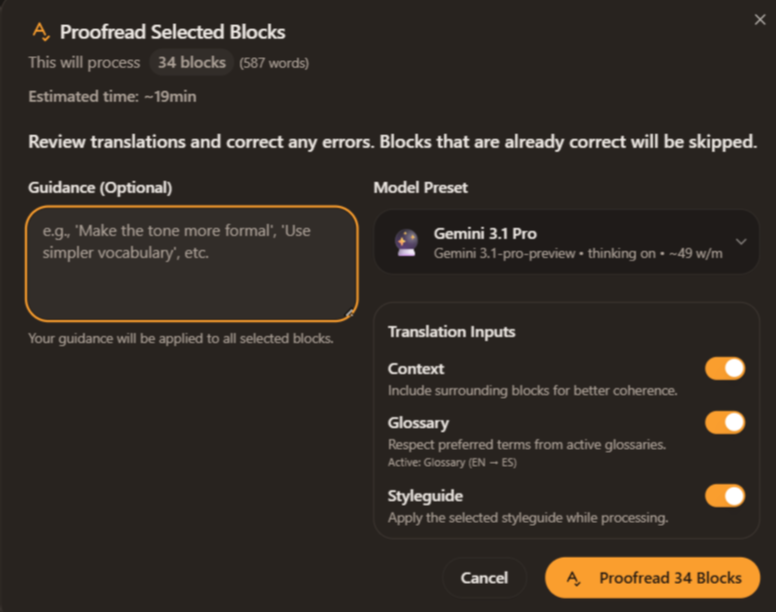
Vision Proofread sees what readers see
Some translation problems only show up when the page is rendered — a CTA that ran long and broke the layout, a label that wrapped onto two lines, a date format that looks wrong in the localized context. Vision Proofread renders the page, reads it like a human, and flags visual issues.
Free to begin · No card required
Text-only proofreading misses anything that only shows up when the page is rendered. A button label that ran 30% longer in German and broke the layout. A subject line that exceeds the preview pane in Outlook. A date format that looks right in the localized cell but wrong in the localized header. Vision Proofread is the multimodal QA pass — it renders the localized output, looks at it the way a reader would, and flags layout and visual issues that text-only review can’t see. Built for HTML emails, landing pages, dashboards, and any localized content where the rendered output matters as much as the underlying text.
Reads the rendered page, not the source
Text-only proofreading misses anything visual. Vision Proofread fills that gap — a multimodal pass that catches what the editor and the QA pass would never see.
Renders the page
For HTML and landing-page translations, Vision Proofread renders the localized output and captures it as the reader would see it.
Reads it visually
Multimodal model reads the rendered page — text, layout, hierarchy, visual proportions. Flags anything that looks off.
Surfaces issues with the offending block
Each flag ties back to the source block or sentence with a screenshot of the issue. Fix in the editor; re-run to verify.
Inline apply
Accept suggested fixes inline. Reject the ones that aren’t worth changing. Move on.
Where vision catches the difference
Localized emails
A CTA that ran long and wrapped onto two lines. A subject line that broke the preview pane. Visible only when rendered.
Landing pages
A hero headline that broke the layout in German because compound nouns. Caught before the campaign goes live.
UI strings & dashboards
Localized button labels overflowing their container. Tooltips that exceed the screen edge. Visual-only issues, made visible.
Questions, answered without the fluff
- HTML emails, landing pages, and any other content that has a rendered output. Plain DOCX translations don’t need it; Smart Proofread is the right tool there.
- Vision Proofread is part of Publish-Ready Mode and Premium mode. Standalone runs use vision-mode credits — slightly higher than Smart Proofread because the model is multimodal.
- The rendered output is sent to a multimodal model along with the source and the styleguide. The model returns flagged issues tied back to specific blocks. The screenshot is not retained after the run.
- It flags them, but doesn’t replace them. Translating image text still needs the source design file.
- Run Smart Proofread on any text content. Run Vision Proofread additionally on rendered-output content — HTML emails, landing pages, anything that has a visual layout. Publish-Ready Mode runs both.
- Button labels that overflow their container, headlines that wrap onto unexpected lines, date and number formats that look wrong in context, hierarchy issues (headings that no longer read as headings after translation), and CTA copy that lost its visual weight.
- It checks the rendered HTML output. For client-specific rendering issues (Outlook quirks, Gmail clipping), still send a Litmus or Email on Acid test before campaigns go live — Vision Proofread is a first-pass catch, not a replacement for cross-client testing.
- The rendered page is sent to the multimodal model along with the source. Standard provider data handling applies (no training on customer data; see the security page). The screenshot is not retained after the run.
- Vision Proofread credits are slightly higher than Smart Proofread because the multimodal models are more expensive. Premium and Publish-Ready modes include Vision Proofread at no additional cost on eligible content.
Keep reading around this capability
- FeatureSmart Proofread before you deliver→After twenty pages, the eye stops catching things. Smart Proofread re-reads the whole translated document against your glossary, your…
- FeatureHTML & email translation with the links intact→Paste in a full HTML email — the kind with inline styles, tracking pixels, three nested tables, and twelve links. Transept translates the…
- FeaturePublish-Ready Mode in one run→The whole workflow, one button. Translate. Enforce the glossary. Apply the styleguide. Proofread for drift. Polish for readability. Run QA.…
- Use caseLocalize a landing page, CTA and all→Import the page or paste the HTML. Translate with CTA copy pinned, product terms enforced, and a marketing styleguide steering the tone.…
- Use caseLocalize the launch kit, all of it→Email, landing page, FAQ, release notes, social posts — the assets that make a launch. Run them through Transept as one bundle with a…