Control
Sentence-level alternatives
Translation isn’t one right answer. Every sentence has three or five reasonable choices, and the best one depends on the page around it. Transept shows you the alternatives — pick, regenerate with a direction, or rewrite by hand.
Free to begin · No card required
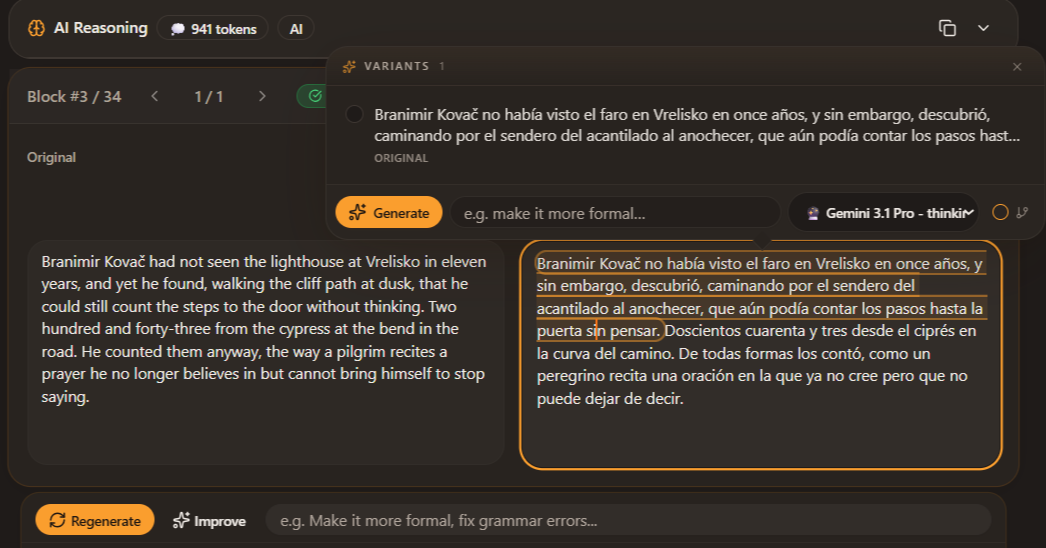
A translation is rarely "one right answer". Even for a straightforward sentence, three or five reasonable renderings usually exist — varying in register, emphasis, rhythm, idiom choice. Pick wrong and the paragraph wobbles. Generic AI translators give you the one rendering their model picked and ask you to trust it. Transept’s alternatives view shows you the options — multiple translations per sentence, varied by tone and structure, all generated against the same source and same styleguide. Pick the one that fits. Regenerate with a direction if none does. The choice stays with the person reading the document, not the model that generated it.
Pick the line, not the first guess
Black-box translation gives you one output and asks you to trust it. Alternatives put the choice back where it belongs — with the person reading the document.
Click the sentence
Three to five alternatives appear, generated from the same source with different tone and structure choices. Pick the one that fits.
Regenerate with a direction
Not seeing the right option? Type a direction — "shorter", "more literary", "keep the metaphor", "less formal" — and Transept regenerates against your styleguide.
Rewrite by hand
Sometimes the right answer is your own line. Edit directly; the change feeds back into Smart Proofread’s view of what "correct" means for this document.
Carry forward
Your choices teach the rest of the document. A regeneration on page 50 reflects the voice you committed to on page 10.
Why it matters most
Dialogue & voice
Character voice, sarcasm, idiom — the things one-shot translators flatten and you have to fix by hand.
Marketing & headlines
A literal translation of a headline is rarely the best one. See alternatives, pick what lands.
Technical precision
A regulated phrase has one correct rendering. The alternative view shows you which option is the safest match.
Questions, answered without the fluff
- Usually three, sometimes five for sentences where the source is ambiguous. Regenerate to see more if none fit.
- Generating alternatives uses credits at the same rate as the first translation. Choosing one costs nothing.
- Yes — free-text directions like "shorter" or "keep the rhyme". The instruction stacks on top of the active styleguide.
- Hand-edits are locked unless you explicitly clear them. A document-wide regenerate skips locked sentences.
- Three by default; up to five for ambiguous sentences. Click "regenerate" to see more options against the same styleguide — useful when the first batch all feel close to the same.
- Yes — free-text directions like "more formal", "shorter", "keep the metaphor", "preserve the rhythm". The instruction stacks on top of the active styleguide so you don’t lose your overall voice direction.
- Generating alternatives uses credits at the same per-sentence rate as the initial translation. Choosing one (or rejecting all) costs nothing additional.
- Hand-edits are treated as locked choices. Document-wide regenerations skip locked sentences. Smart Proofread treats them as ground truth for the rest of the document.
- Yes — regenerate the sentence with a different model from the alternatives panel. The new options appear alongside the previous batch so you can compare model outputs directly.
Keep reading around this capability
- FeatureA styleguide that steers every regeneration→Tone, register, rules, formatting conventions. Build a styleguide manually or have Transept generate one from a sample page of finished…
- FeaturePick the model that fits the work→Different models read different languages differently. Claude for nuance and long context. Gemini for European pairs. GPT for marketing…
- FeatureSmart Proofread before you deliver→After twenty pages, the eye stops catching things. Smart Proofread re-reads the whole translated document against your glossary, your…
- Use caseTranslate a book without losing the voice→A character glossary that holds across 300 pages. A styleguide built from a sample chapter. Sentence-level alternatives for dialogue. A…
- Use caseTranslate the next post without losing your voice→Long-form content lives or dies on voice. Run your post through Transept with a styleguide built from your own writing, choose from…